Vehicle electricsRemoving and installing radio chorus
| Removing and installing radio chorus |
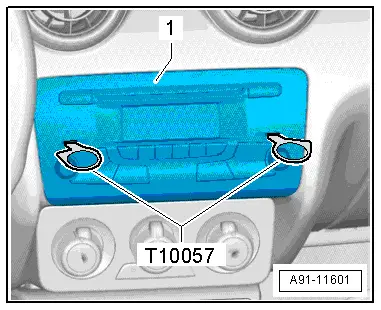
| The radio -R- is located in the dash panel. |
| –
| When renewing control unit, select „Replacement“ function for appropriate control unit in „Guided Fault Finding“. |
| –
| Switch off ignition and all electrical equipment and remove ignition key. |
|
|
|
| –
| Insert two radio release tools -T10057- into slots on radio -R--1- until they engage. Pointed ends of grips must face outwards. |
| –
| Grasp hold of grips on radio release tools -T10057- and pull radio -R--1- out of dash panel. |
| –
| Release and unplug all connectors at radio -R-. |
| –
| Press release tabs on radio -R- and remove radio release tools -T10057-. |
| –
| Plug in all connectors. |
| –
| Slide radio -R- into dash panel until it engages. |
|
|
|
05 General