audi Workshop Repair Guides

Audi Workshop Service and Repair Manuals

Checking vehicle speed sender G68 with 3-pin connector > < Checking wiring between automatic gearbox control unit J217 and gearbox
Checking multi-function switchF125 with 8-pin connector
Checking multi-function switch -F125- with 8-pin connector
  Note
t  Read measured values in display group 001 for multi-function switch before performing electrical check.
t  Make sure that selector lever cable is properly adjusted → Rep. Gr.37.
   
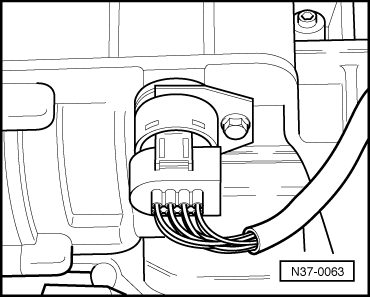
–  Unplug electrical connector at multi-function switch -F125-.
  N37-0063
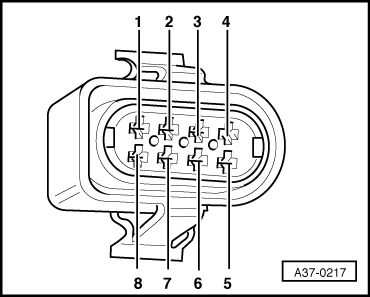
–  Connect multimeter for resistance measurement between contacts on the 8-pin connector and the sockets on adapter cable, (68-pin) -V.A.G 1598/18A- (test box), as shown in the following table.
l  Specification: in each case less than 1.5 Ω.
  A37-0217
Connector
Contact
-V.A.G 1598/18A-
Socket
Connector
Contact
-V.A.G 1598/18A-
Socket
163518
240662
31723
4Contact vacant8Contact vacant

  Note
t  If readout does not match specification, rectify open circuit in wiring according to current flow diagram and check connector for contact corrosion, moisture and leaks.
t  If readout obtained in this wiring check matches specification, multi-function switch must be renewed → Rep. Gr.38.
   
Checking voltage supply of multi-function switch
–  Connect multimeter for voltage measurement between contacts -1- and -7- of the 8-pin connector.
–  Switch on ignition.
l  Specification: approx. battery voltage.
If readout does not match specification:
–  Repair wiring → Current flow diagrams, Electrical fault finding and Fitting locations.
  A37-0217

Checking vehicle speed sender G68 with 3-pin connector > < Checking wiring between automatic gearbox control unit J217 and gearbox