audi Workshop Repair Guides

Audi Workshop Service and Repair Manuals

Exploded view of trim for steering column switch module > < Exploded view of dash panel cover (driver side)
Removing and installing dash panel cover (driver side)
Special tools and workshop equipment required
   
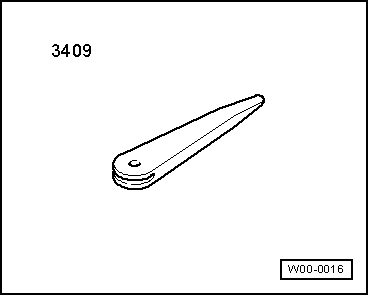
t  Removal wedge -3409-
  W00-0016
Removing
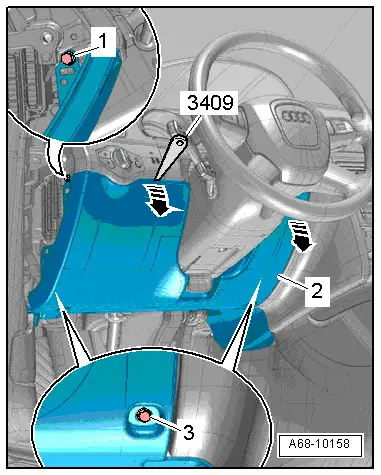
–  Remove dash panel end trim (driver side) → Chapter.
–  Remove bolt -1- at side.
–  Remove bolts -3- at bottom.
–  Unclip top edge of dash panel cover (driver side) -2- from dash panel using removal wedge -3409--arrows-.
–  Unclip 16-pin connector -T16- (diagnostic connector).
–  Equipment version with footwell light: Unplug electrical connector.
–  Detach dash panel cover (driver side).
  A68-10158
Installing
Installation is carried out in the reverse order; note the following:
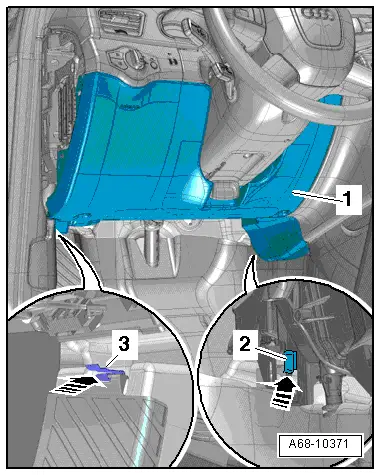
–  Insert dash panel cover (bottom) -1- in clip -3- at foot rest and in clip -2- at air conditioning unit -arrows-.
Tightening torque → Chapter
  A68-10371

Exploded view of trim for steering column switch module > < Exploded view of dash panel cover (driver side)