audi Workshop Repair Guides

Audi Workshop Service and Repair Manuals

Power steering box > < Removing and installing electronic steering column lock control unitJ764
Removing and installing safety lock for active steering (locking solenoid)
Special tools and workshop equipment required
   
t  Torque wrench -V.A.G 1783-
  W00-0990
t  Diagnostic tester e.g. -VAS 5052- with appropriate diagnosis lead
  WARNING
Note the following before working on the steering column.
l  Steering components are safety components!
l  For reasons of safety, all work on the steering system must be carried out by suitably trained and qualified personnel. Work that is not performed properly can result in serious accidents.
l  Restore the layout of the electrical wiring harnesses exactly as it was prior to removal.
l  Restore the attachments of the electrical wiring harnesses exactly as they were prior to removal.
Removing
  Note
The steering wheel must not be turned and the straight-ahead position or the steering angle of the front wheels must not altered when the locking solenoid has been removed. Otherwise the steering wheel may not be properly centred after the work is completed. It is important to keep all components clean when carrying out the following steps.
–  Turn steering wheel to straight-ahead position (front and rear wheels must be in line) and allow steering lock to engage in straight-ahead position if possible.
–  Switch off ignition and remove ignition key.
  W00-1206
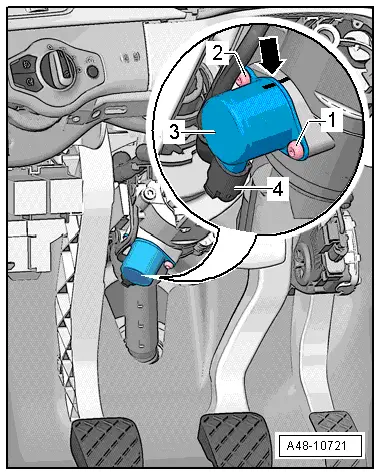
–  Mark installation position of locking solenoid -arrow- (required for subsequent installation).
–  Unplug electrical connector -4- from locking solenoid -3-.
–  Clean paint residue out of heads of Torx bolts -1 and 2-.
–  Remove bolts -1 and 2- and detach locking solenoid -3- from steering column.
  A48-10721
Installing
Installation is carried out in the reverse sequence. Note the following points:
l  After renewing the locking solenoid you must perform a software update of the active steering control unit -J792-; start the corresponding program on the → diagnostic tester.
–  When installing a new locking solenoid, transfer the marking from the old part onto the new one.
–  Fit new locking solenoid according to marking made before removal and secure with two new bolts -1 and 2- (use tool supplied).
  A48-10721
SequenceBolt No.Tightening torque
112 + 2 Nm
224 + 2 Nm
318 + 2 Nm
428 + 2 Nm
   

–  Plug in electrical connector at locking solenoid.
–  Erase event memory.
–  Drive vehicle to initialise system - turn wheels to approx. 45° from the straight-ahead position in both directions.
Checking function
Road test vehicle in an area closed to traffic and check the function of the steering:
t  Steering force
t  Self-centring
t  Play
t  Noise
t  Fault lamp
l  Read out event memory after road test. The event memory must not show any faults.
   

Power steering box > < Removing and installing electronic steering column lock control unitJ764