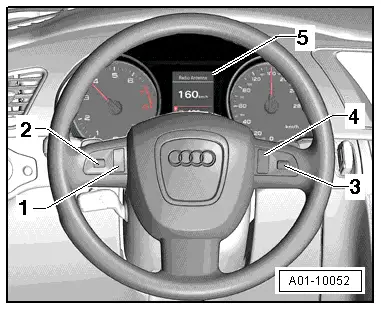
| No. | Control/display element | Function | Remarks |
| 1 | MODE button | The driver can select each of the main function menus in turn by pressing the MODE button repeatedly. | The MODE button and the thumbwheel for selecting menu items are combined in the multifunction buttons on left in steering wheel -E440- unit and cannot be replaced individually. |
| 2 | Thumbwheel for selecting menu items | The driver selects the desired menu item by scrolling the thumbwheel. The selection is confirmed by pressing the thumbwheel. | |
| 3 | Thumbwheel for volume control/repeating navigation cues | The driver adjusts the volume by scrolling the thumbwheel. The last navigation cue is repeated if the thumbwheel is pressed. | The talk button and the thumbwheel for adjusting the volume/repeating navigation cues are combined in the multifunction buttons on right in steering wheel -E441- unit and cannot be replaced individually. |
| 4 | Talk button | The talk button switches the speech dialogue system on and off. | The multifunction buttons on right in steering wheel -E441- can be operated when the ignition is switched off. |
| 5 | Display in dash panel insert | Menus for selecting radio stations, CD tracks or numbers from the telephone directory are displayed each time the driver presses the corresponding button on the steering wheel. Navigation information is also shown in the display. | |