audi Workshop Repair Guides

Audi Workshop Service and Repair Manuals

Removing and installing left aerial for entry and start authorisationR200 > < Removing and installing contact sensor for rear exterior door handle G417/G418
Removing and installing interior aerial 1 for entry and start authorisationR138
Removing and installing interior aerial 1 for entry and start authorisation -R138-
   
Removing
Vehicles equipped with MMI basic:
–  Remove cover for centre console → Rep. gr.68.
Vehicles equipped with MMI convenience:
–  Remove multimedia system operating unit -E380- → Rep. gr.91.
All vehicles (continued):
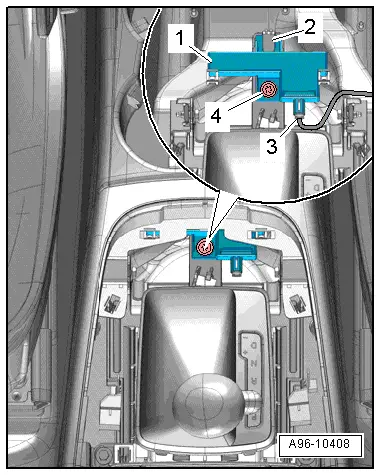
–  Unplug electrical connector -3-.
–  Remove bolt -4-.
–  Detach interior aerial 1 for entry and start authorisation -R138--item 1-.
Installing
l  Tightening torque → Fig.
Installation is carried out in the reverse order; note the following:
–  When installing, make sure that interior aerial 1 for entry and start authorisation -R138- engages in mounting -2-.
Vehicles equipped with MMI basic:
–  Install cover for centre console → Rep. gr.68.
Vehicles equipped with MMI convenience:
–  Install multimedia system operating unit -E380- → Rep. gr.91.
  A96-10408

Removing and installing left aerial for entry and start authorisationR200 > < Removing and installing contact sensor for rear exterior door handle G417/G418