
Cavalier/Z24 V6-191 3.1L VIN T MFI (1994)
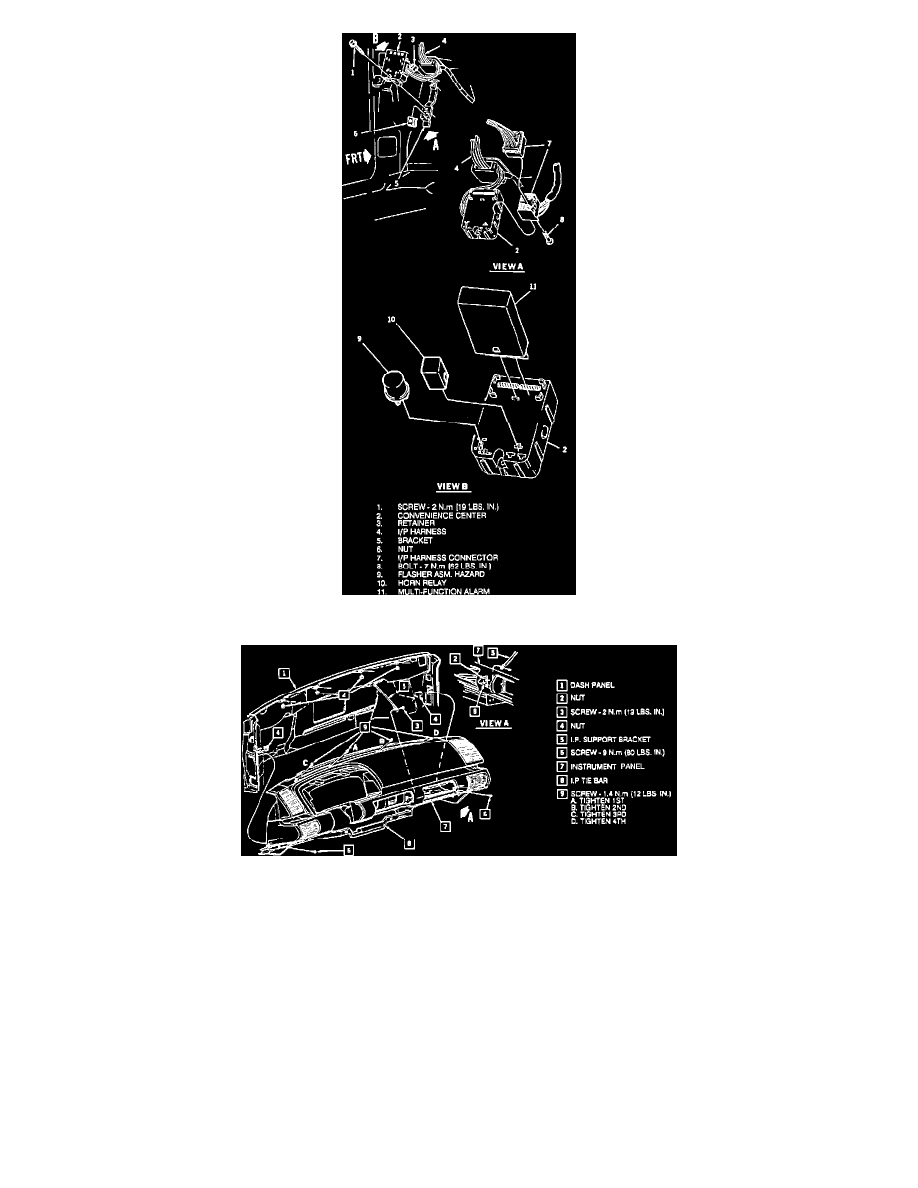
Fig. 89 Convenience Center Removal
Fig. 90 I/P Removal
1.
Disconnect battery ground cable, then remove three screws from steering column opening filler, Fig. 87, and pull downward to disengage clips and
remove.
2.
Remove left and right sound insulators.
3.
Remove instrument panel compartment housing as follows:
a. Open instrument panel compartment door, Fig. 88, then remove screws attaching instrument panel housing to instrument panel.
b. Pull out housing enough to disconnect rear compartment lid release switch and remove instrument panel compartment light and right courtesy
lamp.
c. Remove instrument panel compartment housing.
4.
Remove console assembly, then the convenience center, Fig. 89.
5.
Disconnect forward lamp and engine electrical harnesses from bulkhead connector.
6.
Remove two corner instrument panel retaining screws, and one screw to instrument panel brace at left side of instrument panel opening, Fig. 90.
7.
Remove defroster grilles, then the upper retaining screws located in defroster duct openings.
8.
Remove steering column as described in ``Steering Columns'' section.
9.
Pull instrument panel assembly out enough to disconnect all electrical connectors and vacuum lines.