
Battery Cable: Service and Repair
- Make
- Ford
- Model
- F 450 2WD Super Duty
- Engine
- V10-6.8L VIN V
- Year
- 2005
- Section
- Battery › Battery Cable › Service and Repair
Starting and ChargingService and Repair · page 1 of 3
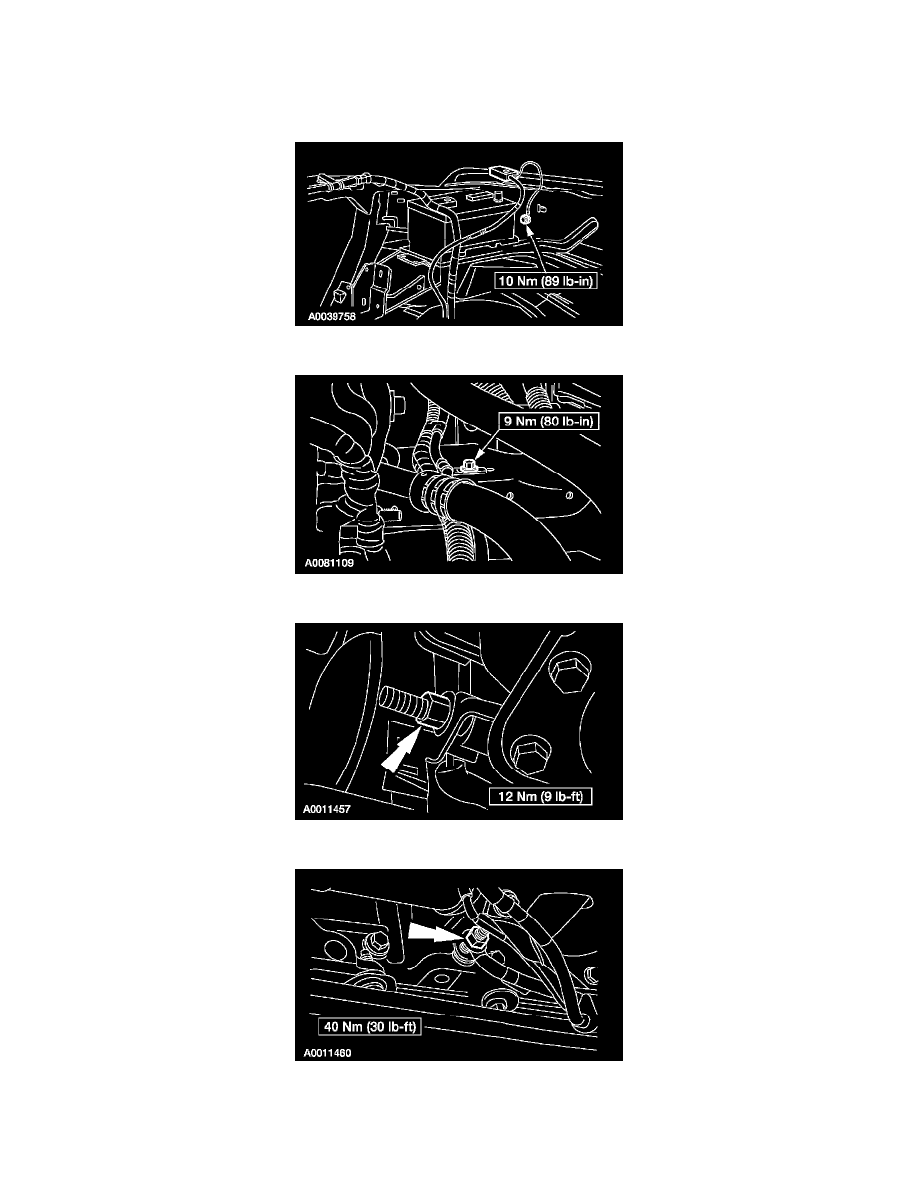
Battery Cable: Service and Repair
BATTERY CABLES
Removal and Installation
1. Disconnect the battery.
2. Remove the battery ground cable screw and remove the cable.
3. Remove the bolt located on the side of the frame rail.
4. Remove the nut on bottom of the engine, near the front engine cover.
5. Remove the stud and the battery ground cable eyelet.
Pinch or Ctrl + scroll to zoom. Double-tap to reset.
Parts & tools for this job For 2005 Ford F 450 2WD 6.8L
- TOOLBattery testerSearch: car battery tester
- TOOLDigital multimeterSearch: automotive digital multimeter
- TOOLBattery terminal cleanerSearch: battery terminal cleaner
Links open Amazon search results in a new tab. As an Amazon Associate I earn from qualifying purchases.