
Flywheel: Specifications (page 13 of 15)
- Make
- Honda
- Model
- Civic
- Engine
- L4-1.8L
- Year
- 2006
- Section
- Flywheel
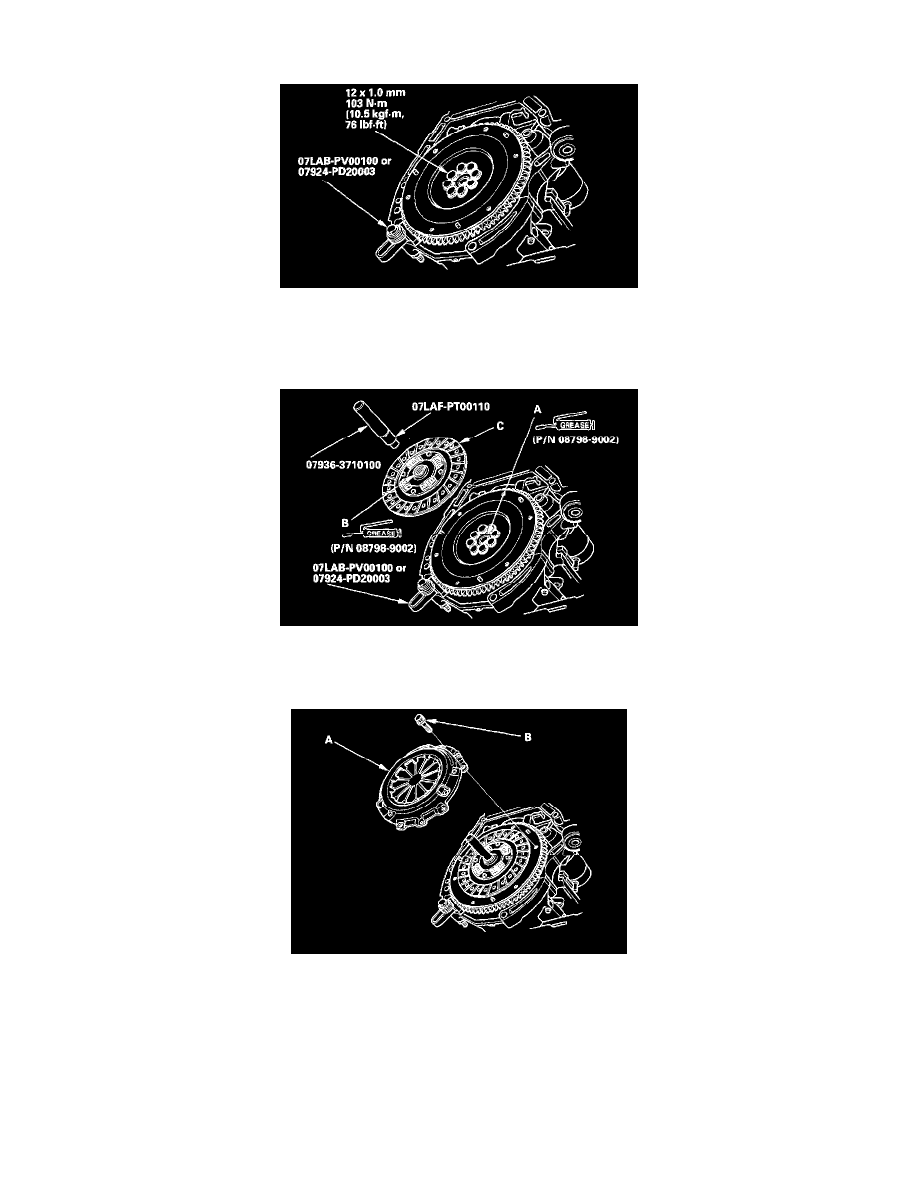
2. Remove the flywheel mounting bolts in a crisscross pattern in several steps, then remove the flywheel.
3. Install the flywheel on the crankshaft, and install the mounting bolts, finger-tight.
4. Install the special tool, then torque the flywheel mounting bolts in a crisscross pattern in several steps.
Clutch Disc and Pressure Plate Installation
1. Temporarily install the clutch disc onto the splines of the transmission mainshaft. Make sure the clutch disc slides freely on the mainshaft.
2. Install the ring gear holder.
3. Apply a light coat of super high temp urea grease (P/N 08798-9002) to the crankshaft pilot bushing (A).
4. Apply super high temp urea grease (P/N 08798-9002) to the splines (B) of the clutch disc (C), then install the clutch disc using the special tools.
5. Install the pressure plate (A) and the mounting bolts (B), finger-tight.
Pinch or Ctrl + scroll to zoom. Double-tap to reset.
Parts & tools for this job For 2006 Honda Civic 1.8L
Links open Amazon search results in a new tab. As an Amazon Associate I earn from qualifying purchases.