
Battery: Service and Repair
- Make
- Honda
- Model
- Civic HF
- Engine
- L4-1.8L
- Year
- 2012
- Section
- Battery › Service and Repair
Battery: Service and Repair
Battery Terminal Disconnection and Reconnection
Disconnection
1. Make sure the ignition switch is in LOCK (0).
2. Disconnect and isolate the negative cable from the battery.
NOTE: Always disconnect the negative side first.
3. Disconnect the positive cable from the battery.
4. Wait at least 3 minutes before starting work.
Reconnection
NOTE: If there is abnormality in performance of the battery, test the battery.
1. Clean the battery terminals.
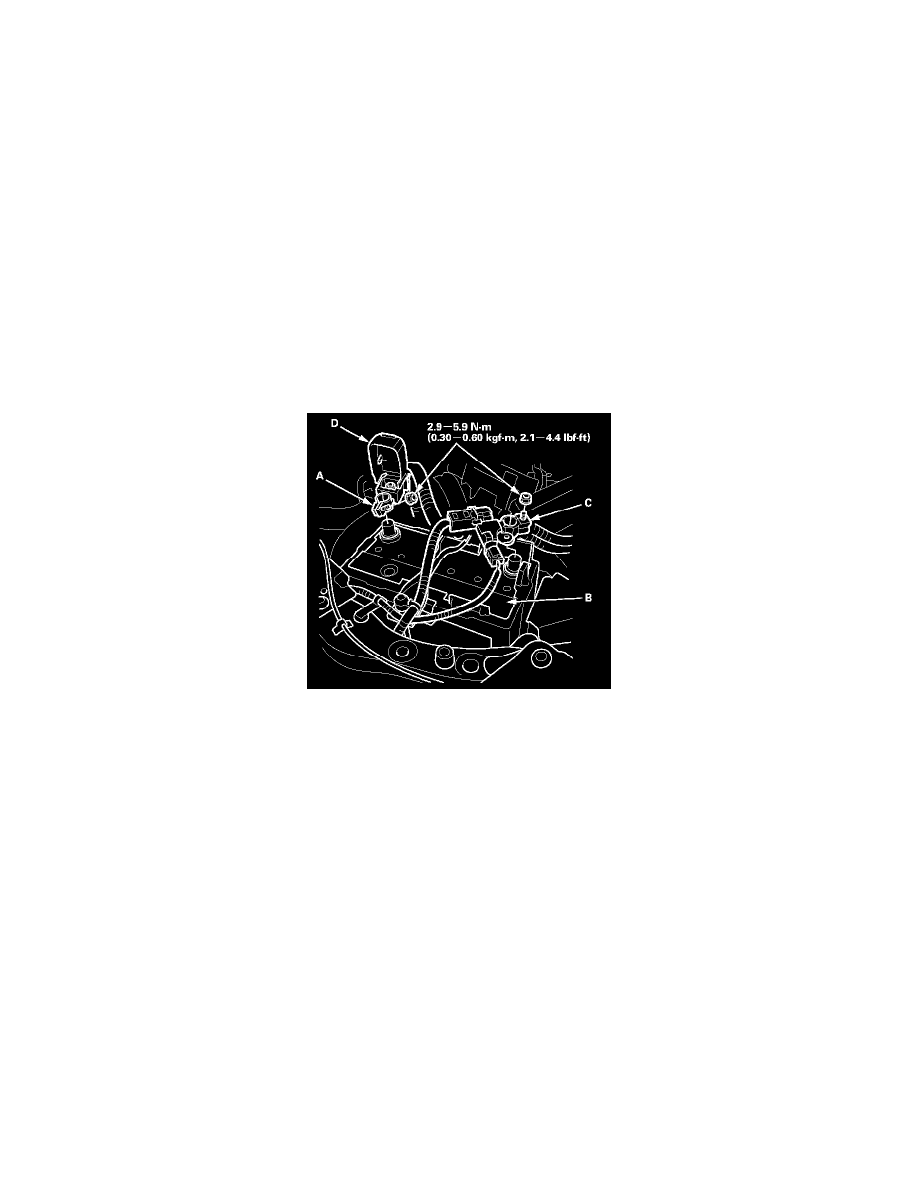
2. Connect the positive cable (A) to the battery (B).
NOTE: Always connect the positive side first.
3. Connect the negative cable (C) to the battery.
4. Apply multipurpose grease to the terminals to prevent corrosion.
5. Install the terminal cover (D).
Pinch or Ctrl + scroll to zoom. Double-tap to reset.
Parts & tools for this job For 2012 Honda Civic 1.8L
- TOOLBattery testerSearch: car battery tester
- TOOLDigital multimeterSearch: automotive digital multimeter
- TOOLBattery terminal cleanerSearch: battery terminal cleaner
Links open Amazon search results in a new tab. As an Amazon Associate I earn from qualifying purchases.