
Gear selector inoperative - ‘e’ clip broken
- Make
- Land Rover
- Model
- Discovery Technical Bulletins
- Section
- Gear selector inoperative - ‘e’ clip broken › Gear selector inoperative - ‘e’ clip broken
GEAR SELECTOR INOPERATIVE - ‘E’ CLIP BROKEN
- Model
- Discovery Automatic Discovery Automatic Defender Automatic (NAS only)
- Affected vehicles
- Prior to VIN 558898 Prior to VIN 724444 Prior to VIN 120146
- Date
- 1997-08-20
- Reference
- 20/08/97
Bulletin text
Gear Selector Inoperative - ‘E’ Clip Broken
MODEL
Discovery Automatic Discovery Automatic Defender Automatic (NAS only)
DETAIL
The driver is unable to move the automatic gearbox selector lever, which is locked in position due to the selector lever shaft retaining clip becoming detached. A new clip has been introduced at the above VINs which will fit earlier vehicles in the event of failure.
ACTION REQUIRED
Confirm failure of the ‘E’ clip and replace with the new latching type as detailed below.
PARTS INFORMATION
Old part no New part no
FTC 3727 Latching Steel Clip TYC 100070
PROCEDURE
Removal of existing ‘E’ clip
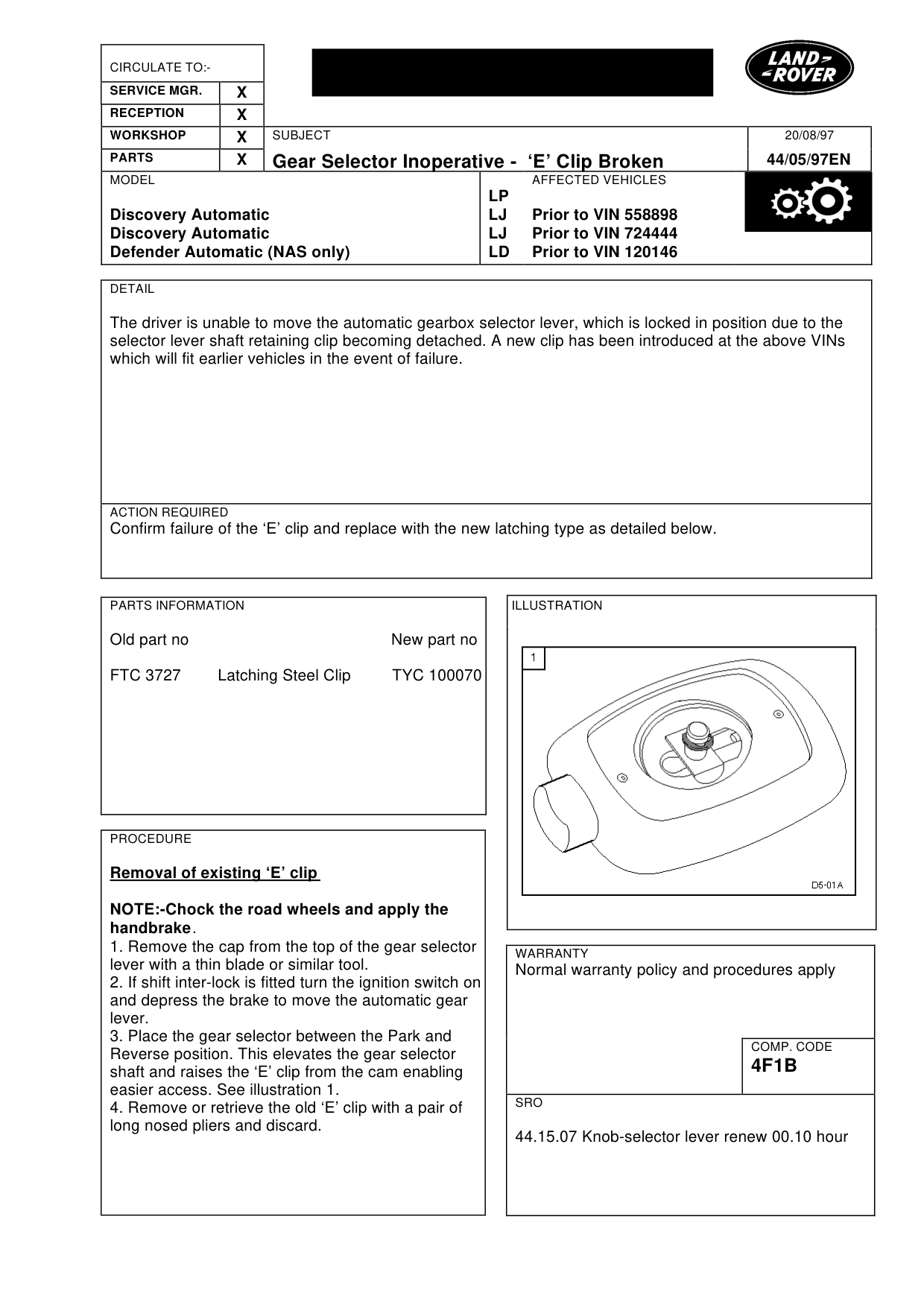
NOTE:-Chock the road wheels and apply the handbrake . 1. Remove the cap from the top of the gear selector lever with a thin blade or similar tool. 2. If shift inter-lock is fitted turn the ignition switch on and depress the brake to move the automatic gear lever. 3. Place the gear selector between the Park and Reverse position. This elevates the gear selector shaft and raises the ‘E’ clip from the cam enabling easier access. See illustration 1. 4. Remove or retrieve the old ‘E’ clip with a pair of long nosed pliers and discard.
20/08/97
44/05/97EN
AFFECTED VEHICLES
LP LJ Prior to VIN 558898 LJ Prior to VIN 724444 LD Prior to VIN 120146
WARRANTY
Normal warranty policy and procedures apply
COMP. CODE
4F1B
SRO
44.15.07 Knob-selector lever renew 00.10 hour
Gear Selector Inoperative - ‘E’ Clip Broken
MODEL
Discovery Automatic Discovery Automatic Defender Automatic (NAS only)
Fitment of new ‘E’ clip - TYC100070
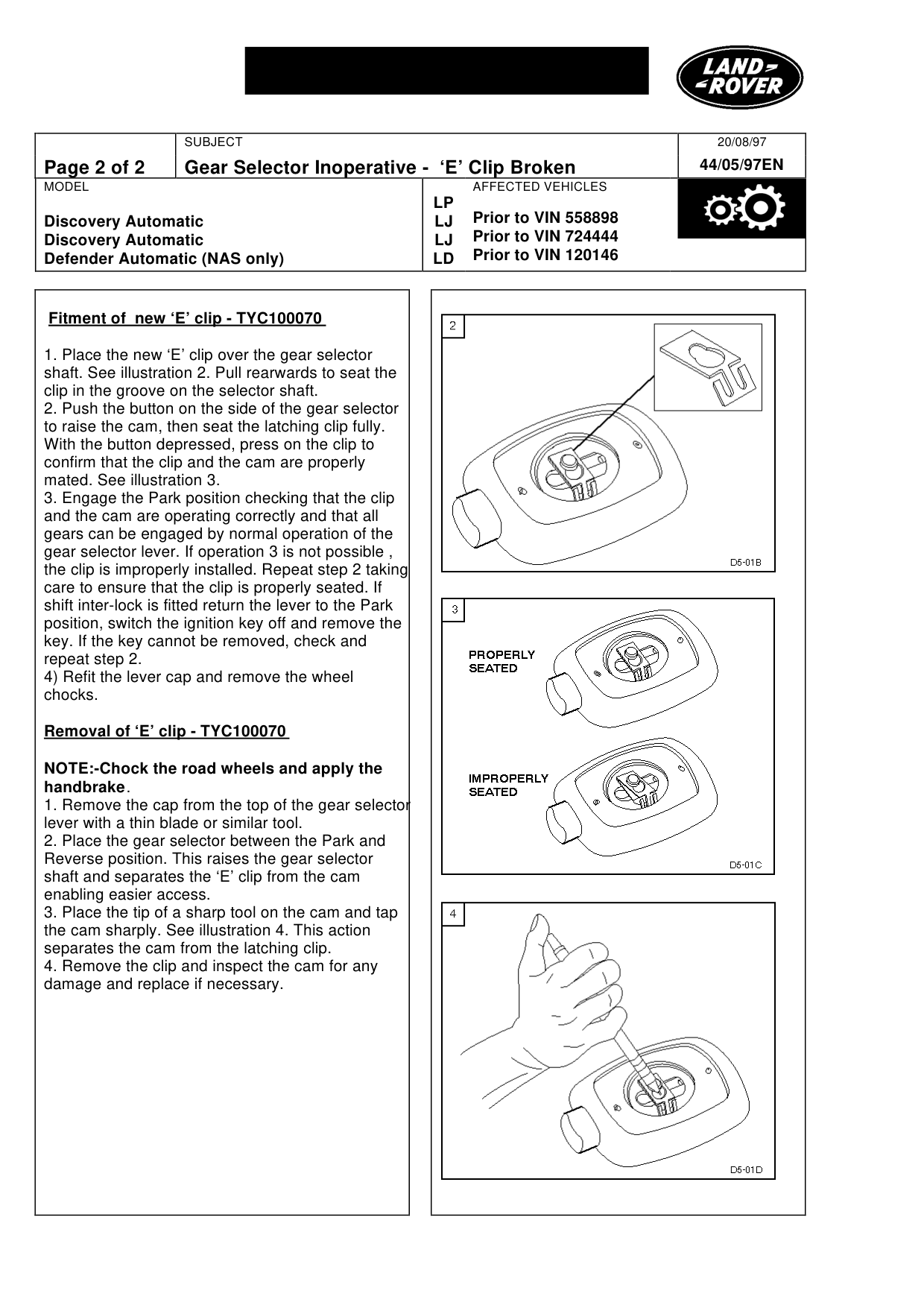
1. Place the new ‘E’ clip over the gear selector shaft. See illustration 2. Pull rearwards to seat the clip in the groove on the selector shaft. 2. Push the button on the side of the gear selector to raise the cam, then seat the latching clip fully. With the button depressed, press on the clip to confirm that the clip and the cam are properly mated. See illustration 3. 3. Engage the Park position checking that the clip and the cam are operating correctly and that all gears can be engaged by normal operation of the gear selector lever. If operation 3 is not possible , the clip is improperly installed. Repeat step 2 taking care to ensure that the clip is properly seated. If shift inter-lock is fitted return the lever to the Park position, switch the ignition key off and remove the key. If the key cannot be removed, check and repeat step 2. 4) Refit the lever cap and remove the wheel chocks.
Removal of ‘E’ clip - TYC100070
NOTE:-Chock the road wheels and apply the handbrake . 1. Remove the cap from the top of the gear selector lever with a thin blade or similar tool. 2. Place the gear selector between the Park and Reverse position. This raises the gear selector shaft and separates the ‘E’ clip from the cam enabling easier access. 3. Place the tip of a sharp tool on the cam and tap the cam sharply. See illustration 4. This action separates the cam from the latching clip. 4. Remove the clip and inspect the cam for any damage and replace if necessary.
20/08/97 44/05/97EN
AFFECTED VEHICLES
LP Prior to VIN 558898 LJ Prior to VIN 724444 LJ Prior to VIN 120146 LD
Parts & tools for this job For Land Rover Discovery
- TOOLTorque wrenchSearch: 3/8 inch torque wrench
- TOOLSocket setSearch: socket set metric
- BOOKHaynes manualSearch: Haynes manual Land Rover Discovery
Links open Amazon search results in a new tab. As an Amazon Associate I earn from qualifying purchases.