
Navigation Radio - Multiple Malfunctions (Navigation Module)
- Make
- Volkswagen
- Model
- Rabbit
- Engine
- L5-2.5L (CBUA)
- Year
- 2008
- Section
- Feb › 09 › Navigation Radio - Multiple Malfunctions
Navigation Module: All Technical Service Bulletins
Navigation Radio - Multiple Malfunctions
9109-04
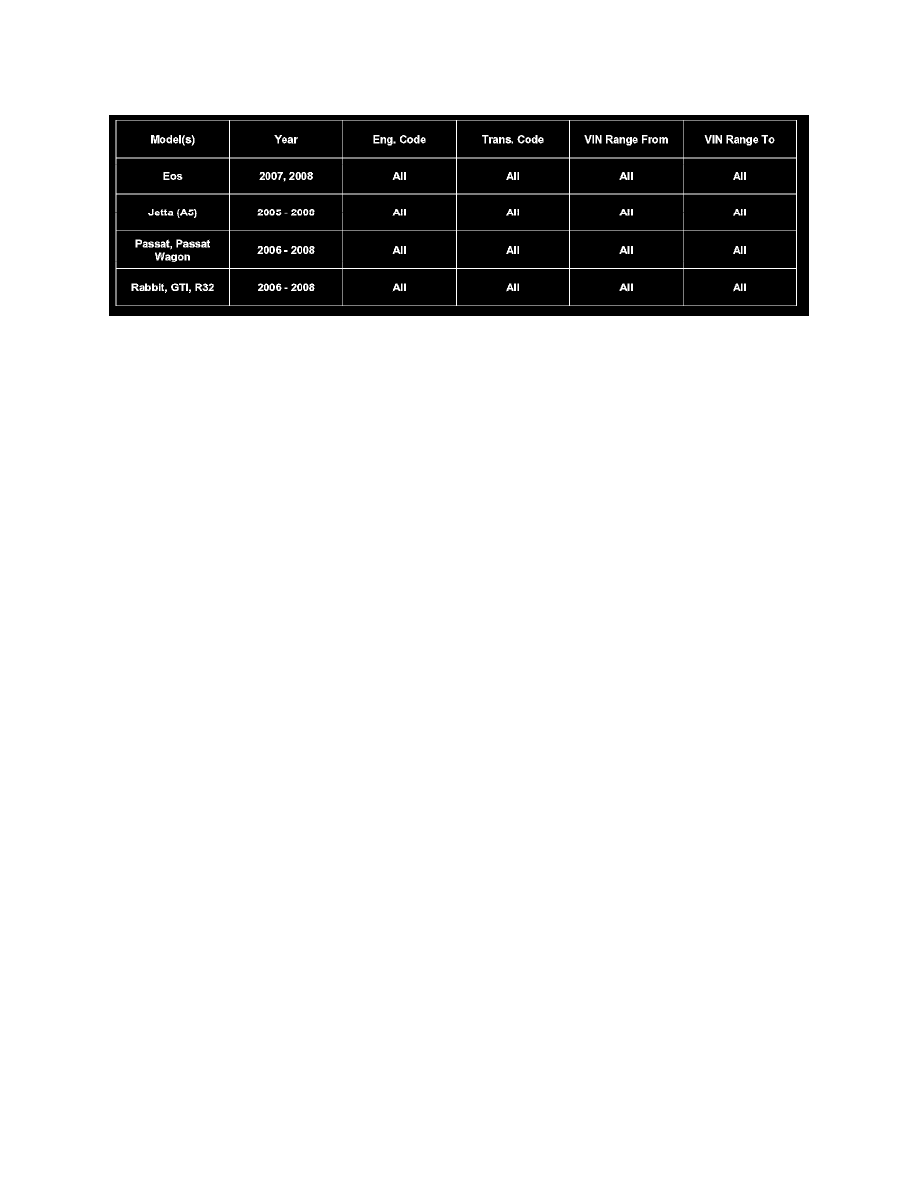
Affected Vehicles
Condition
91 09 04 Feb. 13, 2009 2016982 Supersedes T.B. Group 91 number 08-01 dated Jan. 7, 2008 and replaces T.B. (2015952) Group 91 number 07-12
dated Aug. 17, 2007 due to software programming update.
Radio, Navigation System, Update Programming for Loss of Presets (Sat),
Various Stability Concerns Various malfunctions on radio-navigation system MFD2 DVD:
-
Loss of satellite radio presets
-
Map is empty
-
First part of navigation voice output is missing
-
Radio display in MFI is not shown
-
No sound after engine start (audio CD operation)
-
No radio operation after engine start possible
-
Frequent station list (satellite radio) refresh
-
Various radio stability concerns
Technical Background
Radio software fault.
Production Solution
Updated radio software version 50.
Service
Tip:
-
DO NOT remove navigation unit from vehicle.
-
To perform this procedure in its entirety should take approximately 50 minutes.
-
Procedure will erase presets.
-
If navigation is left ON for more than 1 hour unattended it will turn OFF to conserve battery power. If this occurs, turn navigation back on by
pressing power key and continue SW program from previous step (There is no risk of update being interrupted by this power down).
-
The initial Accept screen has been eliminated beginning with software version 48.
Pinch or Ctrl + scroll to zoom. Double-tap to reset.
Parts & tools for this job For 2008 Volkswagen Rabbit 2.5L
- TOOLOBD2 scannerSearch: OBD2 scanner
- TOOLDigital multimeterSearch: automotive digital multimeter
- TOOLBack-probe test leadsSearch: back probe test leads
Links open Amazon search results in a new tab. As an Amazon Associate I earn from qualifying purchases.