
Rear cushion cover, (single), removed - replacement
- Make
- Alfa Romeo
- Model
- GT Factory Service Manual
- Year
- 2003–2010
- Section
- Rear seats › Rear cushion cover, (single), removed - replacement
‹ Prev Mount (one) fitting rear seat to floor - r rNext › Lh or rh device with cable (one) of one rear seat squab catch r r
Body fittingsRear cushion cover, (single), removed - replacement
REAR CUSHION COVER, (SINGLE), REMOVED - REPLACEMENT
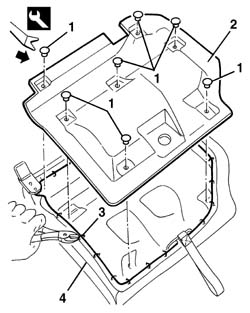
1. Release the retaining buttons using the special tool.
| Name | Country | |
|---|---|---|
| 1 | Scraper blade | 1.823.015.000 |
2. Remove the bottom trim.
3. Cut the rings anchoring the cover to the frame, working along the entire perimeter.
4. Tilt the cushion.
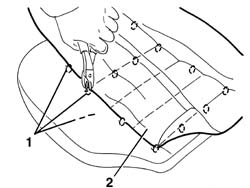
1. Cut the rings anchoring the cover to the padding.
2. Remove the trim.
Check that the cushion cover is intact and shows no signs of damage.
Fit the cover in position and, using the specific tool, clamp the rings anchoring the cover to the padding.
| Name | Country | |
|---|---|---|
| Pliers for metal points | 1.878.017.001 |
Tilt the cushion.
Using the special tool, clamp the rings anchoring the cover to the frame.
Mould the cushion cover into shape.
Fit the bottom cover in position and secure it with the retaining buttons.
‹ Prev Mount (one) fitting rear seat to floor - r rNext › Lh or rh device with cable (one) of one rear seat squab catch r r
Parts & tools for this job For 2003 Alfa Romeo GT
- TOOLTrim removal tool kitSearch: trim removal tool kit
- PARTTouch-up paintSearch: Alfa Romeo touch up paint
- PARTPanel clip assortmentSearch: Alfa Romeo panel clips assortment
Links open Amazon search results in a new tab. As an Amazon Associate I earn from qualifying purchases.