audi Workshop Repair Guides

Audi Workshop Service and Repair Manuals

Handbrake lever - exploded view > < Adjusting handbrake
Brake System
Removing and installing handbrake cable (disc brake)

Removing

 
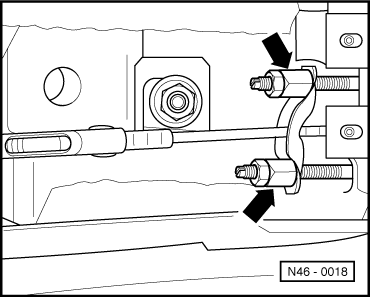
N46-0018
  • ‒ Remove centre console.

=> General Body Assembly, Interior; Repair group 68; Storage compartments, covers and trims; Removing and installing centre console

  • ‒ Release handbrake.
  • ‒ → Unscrew the relevant adjusting nut -arrow-, so that the handbrake cable can be pulled out of the compensating bar.
  • ‒ Raise vehicle.
  • ‒ Remove wheel.
 
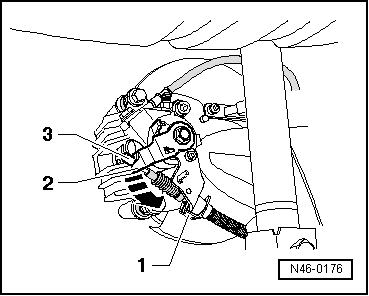
N46-0176
  • ‒ → Detach clip -1-.
  • ‒ Push the handbrake lever -2- in direction of arrow and detach handbrake cable -3-.
 
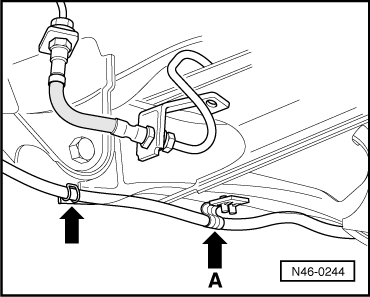
N46-0244
  • ‒ → Unclip handbrake cable from bracket on rear axle beam -arrow A- and out of bracket -arrow-.

 
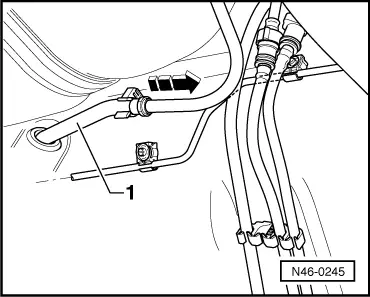
N46-0245
  • ‒ → Pull the handbrake cable out of the guide tube -1- in direction of arrow.

Installing

 
N46-0176
  • ‒ Push handbrake cable into guide tube.
  • ‒ → Push the handbrake lever -2- in direction of arrow and attach handbrake cable -3-.
  • ‒ Install clip -1-.

 
N46-0244
  • ‒ → Clip the handbrake cable in the bracket at the rear axle beam -arrow A-.
  • ‒ The clamp ring on the handbrake cable must be positioned in the centre of the clip.
  • ‒ Engage handbrake cable in bracket -arrow-.
  • ‒ Push the handbrake cable into the compensating bar.
 
N46-0018
  • ‒ → Pretension the handbrake cable using the relevant adjusting nut -arrows-.
  • ‒ Adjusting handbrake =>Page46-57.
  • ‒ Install centre console,

=> General Body Assembly, Interior; Repair group 68; Storage compartments, covers and trims; Removing and installing centre console

Handbrake lever - exploded view > < Adjusting handbrake