audi Workshop Repair Guides

Audi Workshop Service and Repair Manuals

Checking oil pressure switchF22/oil pressure switch for reduced oil pressureF378 > < Oil filter housing, oil pressure switch - exploded view
Removing and installing oil filter housing
Special tools and workshop equipment required
   
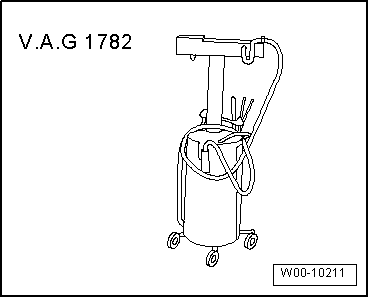
t  Used oil collection and extraction unit -V.A.G 1782-
  W00-10211
Removing
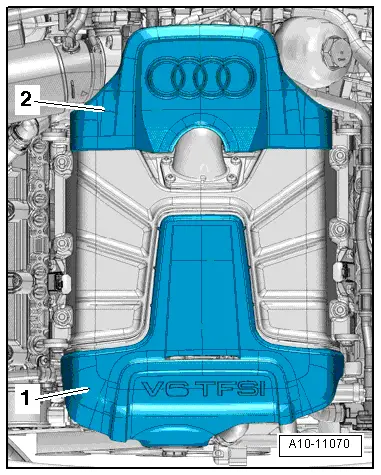
–  Lift off engine cover panel (rear) -2-.
–  Remove oil filter element → Booklet811, → Booklet812 or → Booklet818.
–  Extract engine oil from oil filter housing using used oil collection and extraction unit -V.A.G 1782-.
–  Remove plenum chamber partition panel → Rep. gr.50.
  A10-11070
–  Move clear electrical wiring.
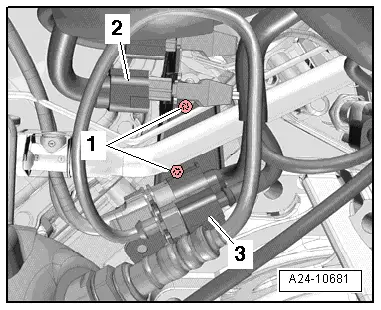
–  Remove bolts -1- and move bracket with electrical connectors to one side.
  Note
Disregard -items 2, 3-.
  Note
  A24-10681
Place a cloth beneath the oil filter housing to catch escaping oil.
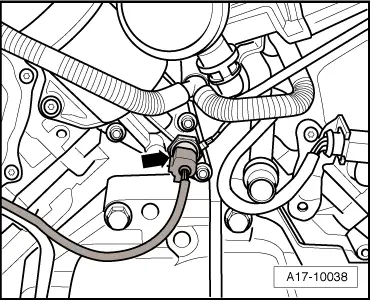
–  Unplug electrical connector -arrow- on oil pressure switch -F22-.
  A17-10038
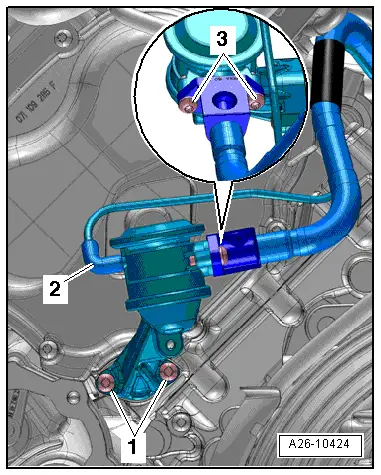
–  Remove bolts -3- and push secondary air hose to rear.
  Note
Disregard -items 1, 2-.
  A26-10424
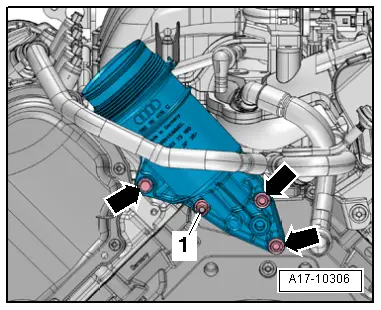
–  Remove bolts -arrows-.
–  Remove nut -1- and centre hex stud, and detach oil filter housing.
Installing
Installation is carried out in the reverse order; note the following:
l  Tightening torques → Chapter „Oil filter housing, oil pressure switch - exploded view“
  Note
Renew seals, gasket and O-ring.
–  Install secondary air hose → Chapter.
–  Install plenum chamber partition panel → Rep. gr.50.
–  Install oil filter element → Booklet811, → Booklet812 or → Booklet818.
–  Fill up with engine oil and check oil level → Booklet811, → Booklet812 or → Booklet818.
  A17-10306

Checking oil pressure switchF22/oil pressure switch for reduced oil pressureF378 > < Oil filter housing, oil pressure switch - exploded view