audi Workshop Repair Guides

Audi Workshop Service and Repair Manuals

Handling and transporting steering column > < Removing and installing intermediate steering shaft
Removing and installing steering column
Special tools and workshop equipment required
   
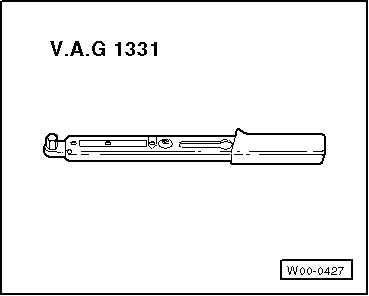
t  Torque wrench -V.A.G 1331-
  WARNING
Before removing the steering column, please note the following points:
Draw a sketch showing
t  the layout of the electrical wiring harnesses
t  the attachment of the electrical wiring harnesses
t  the fitting locations of the cable ties.
This applies particularly to the wiring harness for the electronic steering column lock control unit -J764-.
Before installing the steering column, please note the following points:
l  Restore the layout of the electrical wiring harnesses exactly as it was prior to removal.
l  Restore the attachments of the electrical wiring harnesses exactly as they were prior to removal.
l  All cable ties unfastened or cut open when removing the steering column must be re-attached in the same position when refitting it.
l  When adjusting the steering column, check that the wiring harness leading to the electronic steering column lock control unit -J764- is not trapped and does not come into contact with any sharp edges.
Removing
  Note
t  The replacement steering column is only supplied as a complete unit. Repair is not possible.
t  Only the electronic steering column lock control unit -J764- can be renewed separately.
–  Turn wheels to straight ahead position.
–  Move steering wheel downwards and rearwards as far as possible, using the full range of the steering column adjuster.
–  Remove driver's airbag unit → Rep. gr.69.
–  Remove airbag steering wheel → Chapter.
–  Remove dash panel trim on driver's side → Rep. gr.68.
–  If fitted, remove bracket for right knee bolster (driver side) → Rep. gr.68.
–  Remove footwell vent on driver's side → Rep. gr.87.
–  Remove steering column trim panels → Rep. gr.68.
–  Remove steering column switch module → Rep. gr.94.
  WARNING
On steering columns for dynamic steering: never slacken or remove the bolts of the dynamic steering unit.
  W00-0427
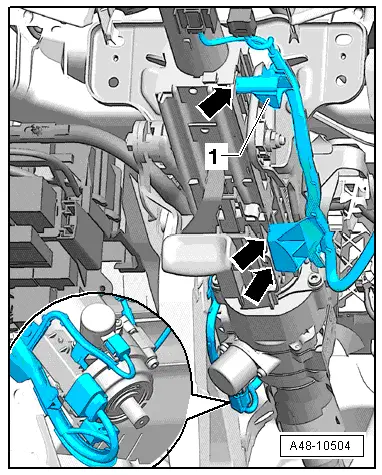
–  Detach wiring guide -1- from steering column -arrows- and place aside.
–  On vehicles with dynamic steering, unplug connectors at adjuster and move wiring guide clear at steering column (left-side).
  A48-10504
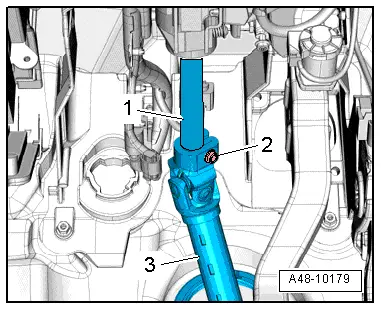
–  Remove bolt -2- and detach intermediate steering shaft -3- from steering column -1-.
  A48-10179
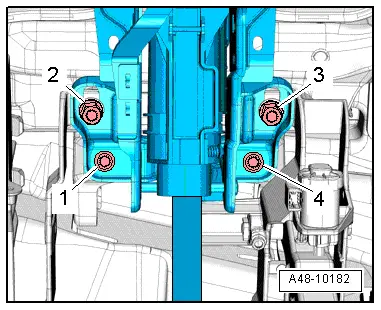
–  Remove bolts -1 … 4- for steering column (bottom) from mounting bracket and pedal bracket.
  A48-10182
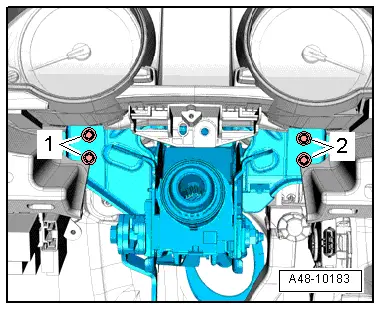
–  Unscrew bolts -1- and -2- for steering column from central tube, supporting steering column by hand from below.
–  Pull steering column back slightly, detach from positioning holes on central tube and lower.
  A48-10183
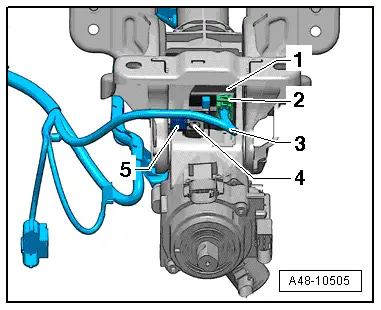
–  Unplug electrical connector -2- at electronic steering column lock control unit -J764--1-, detach clip -5-, move wiring harness -3- clear and detach steering column.
Installing
Installation is carried out in the reverse sequence. Note the following points:
Tightening torques → Chapter „Exploded view of steering column“
t  If steering column has been renewed, use bolt fitted in new steering column → Item for electronic steering column lock control unit -J764-.
  A48-10505
–  Before fitting new bolt -2-, clean threaded hole with a thread tap or similar.
  A48-10179
–  After plugging in connector -2-, make sure wiring harness -3- is secured by clip -5- at the appropriate location.
Check that wiring harness -3- leading to electronic steering column lock control unit -J764--1- does not become trapped and does not come into contact with sharp edges when steering column is adjusted.
  A48-10505
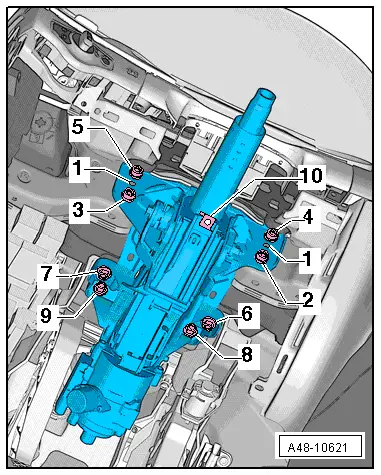
Note correct installation sequence
–  Fit positioning pins -1- on steering column into positioning holes on central tube.
–  Screw in all bolts only loosely.
–  First tighten bolt -2- to specified torque.
–  Then tighten bolt -3- to specified torque.
–  Now tighten bolts -4- and -5- to specified torque.
–  If fitted, install bracket for right knee bolster (driver side) → Rep. gr.68.
–  Then tighten bolts -6- and -7- to specified torque.
–  Tighten bolts -8- and -9- to specified torque.
–  Renew speed nut -10- if steering column has been renewed.
  A48-10621
–  Push intermediate steering shaft -3- onto steering column -1- as far as stop and tighten bolt -2-.
–  Install steering column switch module → Rep. gr.94.
–  Install steering column trim panels → Rep. gr.68.
–  Install footwell vent on driver's side → Rep. gr.87.
–  Install dash panel trim on driver's side → Rep. gr.68.
–  Install airbag steering wheel → Chapter.
–  Install driver's airbag → Rep. gr.69.
–  If the electronic steering column lock control unit -J764- is renewed, the control unit must be adapted to the immobilizer.
  Note
If the same steering column and the same electronic steering column lock control unit -J764- are being re-installed, the electronic steering column lock control unit -J764- does not have to be adapted.
–  Connect vehicle diagnosis, testing and information system -VAS 5052- and start Guided Functions for the vehicle in question.
–  Select the relevant program in „Guided Functions“.
–  Follow the instructions on the screen.
–  After installing steering column switch module, calibrate steering angle sender -G85-.
–  Connect vehicle diagnosis, testing and information system -VAS 5052- and start Guided Functions for the vehicle in question.
–  Follow the instructions on the screen.
  A48-10179

Handling and transporting steering column > < Removing and installing intermediate steering shaft