audi Workshop Repair Guides

Audi Workshop Service and Repair Manuals

Removing and installing radioR (MMI from week 45/08 onwards) > < Removing and installing multimedia system operating unitE380
Removing and installing radioR (MMI up to week 44/08)
Removing and installing radio -R- (MMI up to week 44/08)
The radio -R- (MMI) is located behind the luggage compartment side trim (left-side) in the infotainment rack.
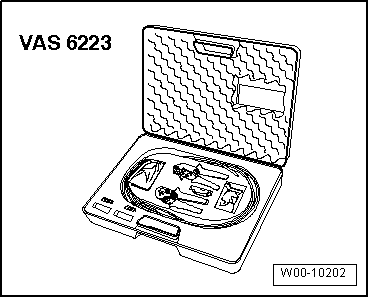
Special tools and workshop equipment required
   
t  Protective cap for cable connector -VAS 6223/9-
–  Switch off all electrical equipment.
–  Remove ignition key.
–  When renewing control unit, select „Replacement“ function for appropriate control unit in „Guided Fault Finding“.
To do so, use → Vehicle diagnostic tester.
Removing
–  Open left-side luggage compartment storage area.
  W00-10202
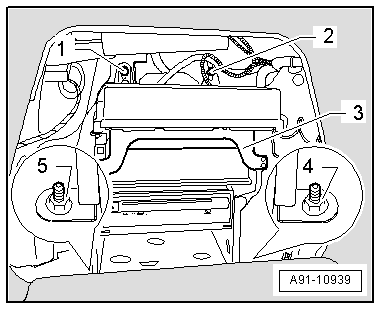
–  Unscrew nuts -1-, -2-, -4- and -5- on infotainment rack -3-.
–  Pivot rack into luggage compartment.
  A91-10939
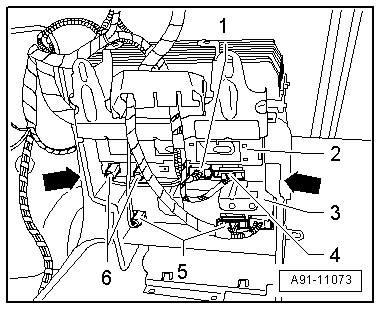
–  Release and unplug connectors -1-, -4- and -6-, at radio -R--2- and -5- and at navigation system with CD drive control unit -J401--3- on reverse side.
  A91-11073
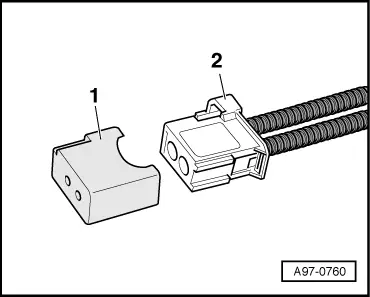
–  Fit protective cap for cable connector -VAS 6223/9--1- onto MOST bus connector -2-.
  A97-0760
–  Unscrew bolts -arrows- at rack (left and right).
–  Pull radio -R--2- to rear out of rack.
Installing
–  Install in reverse sequence of removal.
Tightening torques → Chapter
  A91-11073

Removing and installing radioR (MMI from week 45/08 onwards) > < Removing and installing multimedia system operating unitE380