Audi Workshop Service and Repair Manuals
HOME
FEATURES
MENU
INDEX
ABOUT US
Removing and installing tiptronic switches (from model year 2013 onwards) >
< Removing and installing multifunction buttons in 3-spoke steering wheel (from model year 2013 onwards)
A4 Mk3
Vehicle electrics
Communication / Infotainment
Multi-function steering wheel
Removing and installing tiptronic switches (up to model year 2012)
Removing and installing tiptronic switches (up to model year 2012)
Removing and installing tiptronic switches (up to model year 2012)
–
Switch off all electrical equipment.
–
Remove ignition key.
Removing
–
Remove driver's airbag
→ General body repairs, interior; Rep. gr.69
.
–
Pull trim ring off steering wheel.
–
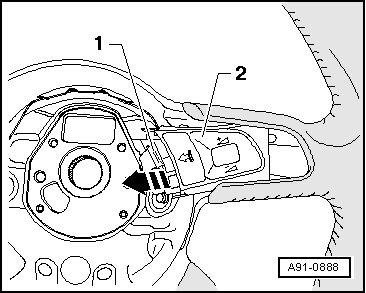
Push multifunction button
-2-
out of steering wheel in direction of arrow.
–
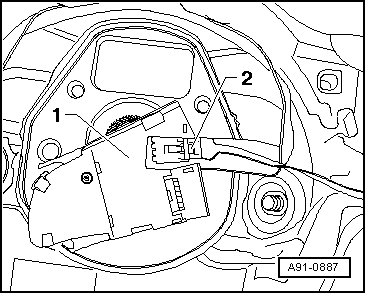
Turn multifunction button over.
–
Release and unplug connector
-2-
at multifunction button
-1-
.
–
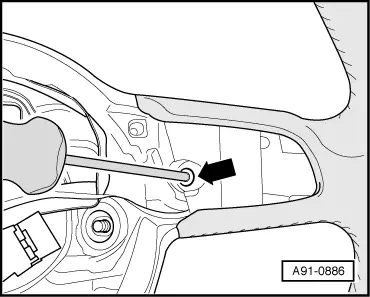
Unscrew bolt
-arrow-
and remove tiptronic switch from behind steering wheel.
Installing
–
Install in reverse sequence of removal.
Tightening torques
→ Chapter
Vehicle electrics
Communication / Infotainment
Multi-function steering wheel
Removing and installing tiptronic switches (up to model year 2012)
Removing and installing tiptronic switches (from model year 2013 onwards) >
< Removing and installing multifunction buttons in 3-spoke steering wheel (from model year 2013 onwards)