Audi Workshop Service and Repair Manuals
HOME
FEATURES
MENU
INDEX
ABOUT US
Removing and installing chip card reader control unitJ676 >
< Connectors on chip card reader control unitJ676 (from week 45/08 onwards)
A4 Mk3
Vehicle electrics
Communication / Infotainment
Navigation system (Japan)
Removing and installing traffic data aerialR173
Removing and installing traffic data aerialR173
Removing and installing traffic data aerial -R173-
–
Switch off all electrical equipment.
–
Remove ignition key.
Removing
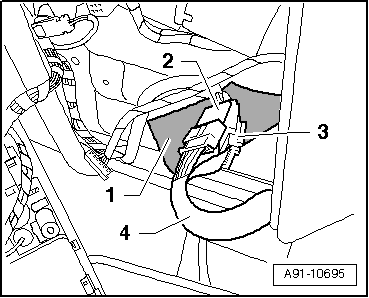
The connectors for the traffic data aerial -R173- are located behind the front interior light -W1-.
–
Remove front interior light -W1-
→ Electrical system; Rep. gr.96
.
Connectors at front interior light -W1- do not need to be detached.
–
Detach foam sheath
-1-
.
–
Release and disconnect connectors
-2-
and
-3-
.
–
Push wiring
-4-
towards traffic data aerial -R173- at windscreen.
Removing traffic data aerial -R173-
–
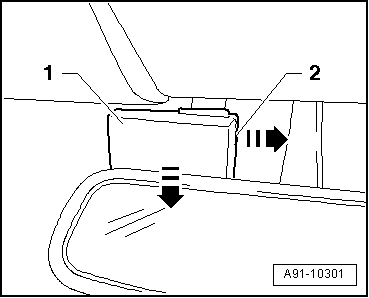
Use a small screwdriver to pull out the expanding clip
-2-
in direction of arrow.
–
Pull traffic data aerial -R173-
-1-
down off windscreen in direction of arrow.
Installing
–
Install in reverse sequence of removal.
Exploded view
→ Chapter
Vehicle electrics
Communication / Infotainment
Navigation system (Japan)
Removing and installing traffic data aerialR173
Removing and installing chip card reader control unitJ676 >
< Connectors on chip card reader control unitJ676 (from week 45/08 onwards)