Audi Workshop Service and Repair Manuals
HOME
FEATURES
MENU
INDEX
ABOUT US
Removing and installing humidity senderG355 - vehicles with main beam assist >
< Exploded view of main beam assist system, humidity sender and lane departure warning system
A4 Mk3
Vehicle electrics
Electrical system
Lights, lamps, switches inside, anti-theft system
Components on interior mirror
Removing and installing humidity senderG355 - vehicles without main beam assist
Removing and installing humidity senderG355 - vehicles without main beam assist
Removing and installing humidity sender -G355- - vehicles without main beam assist
Removing
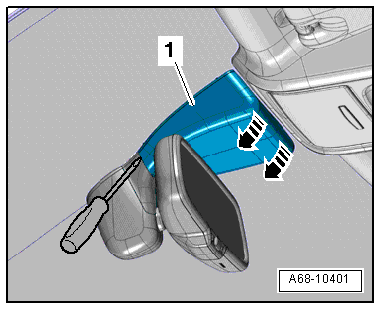
Vehicles with lane departure warning:
–
Unclip cover
-1-
(top) at mirror base
-arrows-
.
–
Use a screwdriver to disengage cover (bottom) at mirror base and detach.
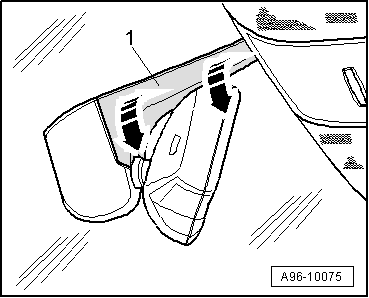
Vehicles without lane departure warning:
–
Pry open cover
-1-
(top) at interior mirror base
-arrows-
.
All vehicles (continued):
–
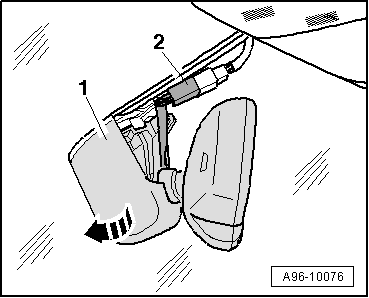
Remove the electrical connector from its retainer.
–
Unplug electrical connector
-2-
.
–
Turn interior mirror at mirror base
-1-
anti-clockwise
-arrow-
as far as the stop.
–
Remove interior mirror from the retaining plate.
–
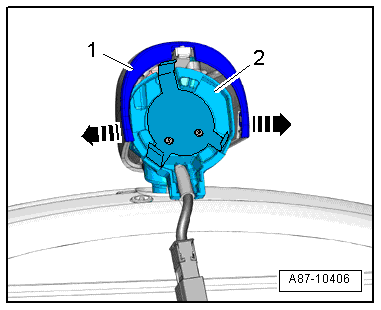
Press cover
-1-
apart slightly at both sides
-arrows-
and detach from interior mirror base
-2-
.
–
Unplug electrical connector
-2-
.
–
Use a small screwdriver
-3-
to carefully pry humidity sender -G355-
-item 4-
out of cover
-1-
-arrow-
, lifting off at the same time.
Installing
Installation is carried out in the reverse order; note the following:
–
Carefully insert humidity sender -G355- in side guides.
Note
The cover cannot be installed if the humidity sender -G355- is not fitted correctly.
–
Install interior mirror
→ Rep. gr.68
.
Vehicle electrics
Electrical system
Lights, lamps, switches inside, anti-theft system
Components on interior mirror
Removing and installing humidity senderG355 - vehicles without main beam assist
Removing and installing humidity senderG355 - vehicles with main beam assist >
< Exploded view of main beam assist system, humidity sender and lane departure warning system
 Note
Note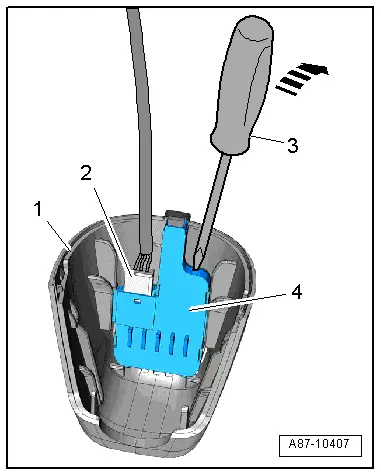
 Note
Note