audi Workshop Repair Guides

Audi Workshop Service and Repair Manuals

Removing and installing hazard warning lights buttonE229 > < Removing and installing light switchE1
Removing and installing headlight range control regulatorE102
Removing and installing headlight range control regulator -E102-
   
Removing
–  Remove dash panel trim (driver's side) → Rep. gr.68.
–  Remove trim cover for instrument cluster → Rep. gr.68.
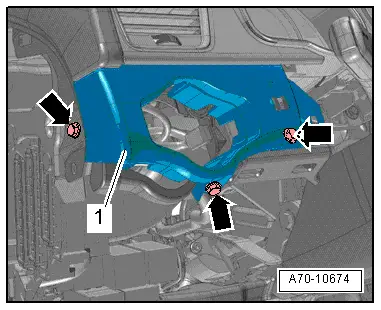
–  Remove bolts -arrows- and detach light switch panel -1-.
–  Unplug electrical connector for light switch -E1-.
  Note
Illustration shows light switch -E1- removed.
  A70-10674
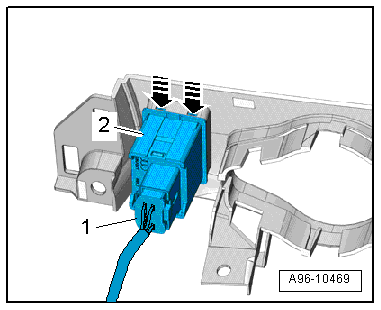
–  Unplug electrical connector -1- on headlight range control regulator -E102- (press release tab).
–  Carefully release retaining hooks -arrows- using a small screwdriver.
–  Press headlight range control regulator -E102--item 2- out of light switch panel.
Installing
Installation is carried out in the reverse order; note the following:
–  Install light switch panel → Rep. gr.70.
–  Install trim cover for instrument cluster → Rep. gr.68.
–  Install dash panel trim (driver's side) → Rep. gr.68.
  A96-10469

Removing and installing hazard warning lights buttonE229 > < Removing and installing light switchE1