Audi Workshop Service and Repair Manuals
HOME
FEATURES
MENU
INDEX
ABOUT US
Removing and installing CAN isolating connector (dash panel)T46s >
< Removing and installing fuse holder DSD with fuse carrier in dash panel (right-side)
A4 Mk3
Vehicle electrics
Electrical system
Wiring
Relay carriers, fuse carriers (vehicle interior)
Removing and installing fuse carrier in dash panel (right-side)
Removing and installing fuse carrier in dash panel (right-side)
Removing and installing fuse carrier in dash panel (right-side)
Removing
–
With ignition switched off, disconnect earth cable at battery
→ Chapter
.
–
Remove glove box
→ Rep. gr.68
.
–
Release retaining clips
-1-
in direction of
-arrow-
and press fuse carriers
-2-
and
-3-
out of fuse holder D towards rear.
Note
Disregard
-item 4-
.
–
If fitted, release captive fastener and pull it off fuse carrier.
–
Remove fuses from fuse carrier.
–
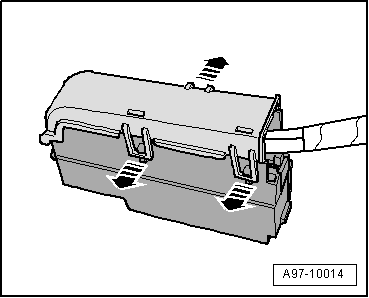
Release retaining clips
-arrows-
and remove cover from fuse carrier.
–
Pull off retaining strip
-1-
for connectors
-arrow-
and take connectors out of socket.
Note
Exact contact assignment of fuse carrier in dash panel (right-side) can be found in applicable current flow diagram
→ Current flow diagrams, Electrical fault finding and Fitting locations
.
Installing
Installation is carried out in the reverse order; note the following:
–
Install glove box
→ Rep. gr.68
.
–
Connect battery. Steps required
→ Anchor
.
Vehicle electrics
Electrical system
Wiring
Relay carriers, fuse carriers (vehicle interior)
Removing and installing fuse carrier in dash panel (right-side)
Removing and installing CAN isolating connector (dash panel)T46s >
< Removing and installing fuse holder DSD with fuse carrier in dash panel (right-side)
 Note
Note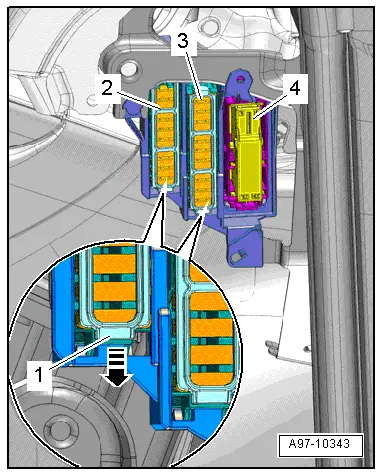
 Note
Note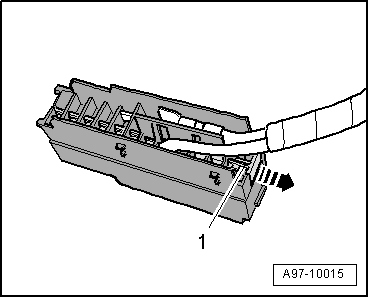
 Note
Note
Note
Note