
Removing and installing internet access aerial
- Make
- Audi
- Model
- A5 Cabriolet
- Year
- 2009–2017
- Section
- Aerial systems › Removing and installing internet access aerial
Removing and installing internet access aerial
The internet access aerial R266 (WLAN aerial) is located behind the glove box on the air duct.
Switch off ignition and all electrical equipment and remove ignition key.
Remove glove box General body repairs, interiorRep. gr.68Shelves / trim panels; Removing and installing glove box.
Internet access aerial R266 is bonded to air duct.
Unplug connector (2) at internet access aerial R266(1).
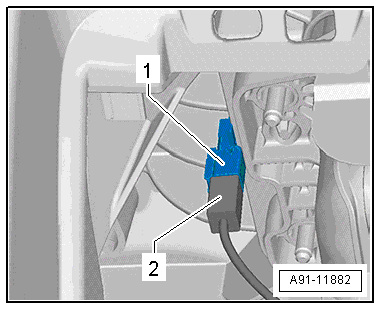
Use a small screwdriver to remove internet access aerial R266(1) from bonding area.
Clean bonding area on air duct thoroughly with isopropanol.
Remove protective foil on bonding surface of internet access aerial R266.
Press and hold internet access aerial R266(1) against bonding area on air duct for about 10 seconds.
Continue installation in reverse sequence.
Parts & tools for this job For 2009 Audi A5
- TOOLDigital multimeterSearch: automotive digital multimeter
- PARTAssorted fuse kitSearch: car fuse assortment kit
- TOOLWire crimper and connector kitSearch: wire crimper connector kit
As an Amazon Associate we earn from qualifying purchases.