
Removing and installing infotainment system display
- Make
- Audi
- Model
- A5 Sportback
- Year
- 2009–2016
- Section
- Infotainment system › Removing and installing infotainment system display
‹ Prev Overview of fitting locations - infotainment system, Japan, from week 45/2008 onwardsNext › Removing and installing control unit for front display and information control panel
Electrical: CommunicationRemoving and installing infotainment system display
Removing and installing infotainment system display
Display unit for front information display and operating unit control unit J685 (display) is located in dash panel (centre).
Switch off all electrical equipment.
Remove ignition key.
Remove cover for MMI screen General body repairs, interiorRep. gr.70Dash panel; Removing and installing cover for MMI screen.
Unscrew bolts (arrows) at display (1).
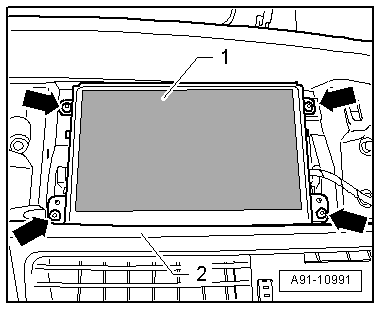
Lift display (1) out of dash panel (2).
Release and unplug connectors at display.
Install in reverse sequence of removal.
- Chapter“Overview of fitting locations - infotainment system”
- Chapter“Overview of fitting locations - radio”
‹ Prev Overview of fitting locations - infotainment system, Japan, from week 45/2008 onwardsNext › Removing and installing control unit for front display and information control panel
Parts & tools for this job For 2009 Audi A5
- TOOLDigital multimeterSearch: automotive digital multimeter
- PARTAssorted fuse kitSearch: car fuse assortment kit
- TOOLWire crimper and connector kitSearch: wire crimper connector kit
As an Amazon Associate we earn from qualifying purchases.