
Calling up technical services software
- Make
- Audi
- Model
- A6 C5
- Year
- 1997–2004
- Section
- Navigation system I › Calling up technical services software
Calling up technical services software
Technical service software is called up as follows:
Switch off the ignition and wait about 5 seconds.
Press and hold the 0I button and the INFO button on the operating unit simultaneously, switch the ignition “on”, then release both buttons.
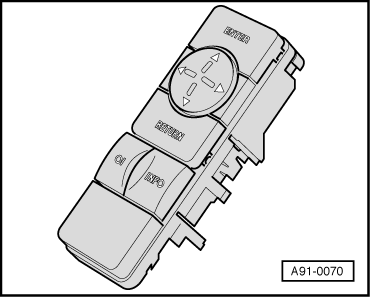
Indicated on display:
| NAV. 4D0919887D - - - - - - - - - - - - - - | |
| > | AUDI VW |
Select the menu option “AUDI” using the cursor buttons.
Confirm the selection using the ENTER button.
Indicated on display:
| > | DEUTSCH ENGLISH ESPANOL FRANCAIS ITALIANO NEDERLAND |
Select required language using the cursor buttons.
Confirm the selection using the ENTER button.
Indicated on display:
| AUDI NAVI CALIBRATION PROGRAM - - - - - - - - - - - - - - | |
> | FACTORY SERVICE |
Select the menu option “SERVICE” using the cursor buttons.
Confirm the selection using the ENTER button.
Indicated on display:
| REAR WINDOW HEATING OFF! | |
| > | OK |
Technical service software functions must be performed with heated rear window switched off.
Switch off heated rear window.
Confirm “OK” in the display using the ENTER button.
Indicated on display:
| SERVICE MENU: | |
| > | WHEEL CALIB. WIRING TEST DRIVE SYS. TEST END |
Note
- Terminate technical service software via menu item “END”.
- It is also possible to terminate technical service software at any time by switching the ignition “off”, however calibration settings already made will NOT be saved.
Parts & tools for this job For 1997 Audi A6
- TOOLDigital multimeterSearch: automotive digital multimeter
- PARTAssorted fuse kitSearch: car fuse assortment kit
- TOOLWire crimper and connector kitSearch: wire crimper connector kit
As an Amazon Associate we earn from qualifying purchases.