
Removing and installing digital TV tuner R171
- Make
- Audi
- Model
- A6 C6
- Year
- 2004–2011
- Section
- TV system › Removing and installing digital TV tuner R171
Removing and installing digital TV tuner R171
The digital TV tuner R171 is located behind the luggage compartment side trim (left-side).
Special tools and workshop equipment requiredVehicle diagnosis, testing and information system VAS 5051B
Switch off all electrical equipment.
Remove ignition key.
Open left-side luggage compartment storage area.
Remove luggage compartment side trim (left-side) General body repairs, interiorRep. Gr.70.
Unscrew the nuts (2) and (4) (5 Nm) and bolt (3) (5 Nm) on the infotainment rack (3).
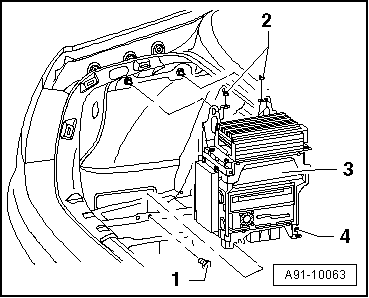
Pivot the rack in the luggage compartment until the connectors and securing bolts for the digital TV tuner R171(1) are accessible.
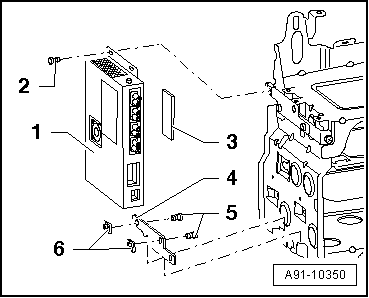
Unplug all connectors on digital TV tuner R171(1).
Unscrew bolt (2) (2 Nm).
A retaining plate (4) is fitted to digital TV tuner R171(1) (bottom). The digital TV tuner R171(1) with retaining plate (4) is fitted to clips at bottom of rack.
Lift off the digital TV tuner R171 from the clips and from the rack.
Unscrew bolts (5) (2 Nm) and remove retaining plate (4) from digital TV tuner R171(1).
Make sure that spacer (3) is bonded to reverse side of digital TV tuner R171(1).
Then fit retaining plate (4) to digital TV tuner R171 and secure with speed nuts (6) and bolts (5) (2 Nm).
Perform further installation in reverse sequence.
Switch on ignition.
Press E button on digital TV tuner R171.
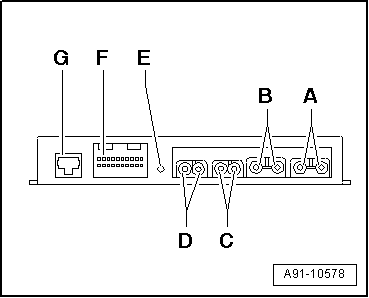
To do so, use a 2.5 mm hexagon key.
Simultaneously (or at least within 1 second) press MENU button on remote control.
Switch to “TV” at the multimedia system operating unit E380.
“TV” should appear on the display unit for front information display and operating unit control unit J685.
Check whether analogue TV reception is available.
Please note that analogue TV reception may vary according to your current location.
Switch to “External AV source” at the multimedia system operating unit E380.
“External AV source” should appear on the display unit for front information display and operating unit control unit J685.
Connect up the vehicle diagnosis, testing and information system VAS 5051B.
Switch on ignition.
Touch “Self-diagnosis” key on tester display.
Touch “57 TV tuner” key on tester display.
Note
- The digital TV tuner R171 does not have a self-diagnosis function; only a limited diagnosis of the aerial and video connections is available via the factory-fitted TV tuner R78.
Select diagnosis function “Read measured value block” from list.
Enter desired 3-digit display group number on keypad and confirm entry by touching Q key.
Display group number: 009
If the wires for voltage supply and aerials have been properly fitted, the display zones should show “Yes” in the first zone and “NO” in the second zone.
If not, check wiring and repeat the diagnosis.
| Read measured value block 9 | → | ▾ Indicated on display | ||||
| YES | No | |||||
| External input AV 2 | ||||||
| External input AV 1 | ||||||
Terminate diagnosis.
After the remote control has been successfully initialised, the operating screen for the digital TV tuner R171 will appear in the display unit for front information display and operating unit control unit J685 (“External AV source” must be activated).
Check to see if the operating screen for the digital TV tuner R171 can be operated with the remote control.
Parts & tools for this job For 2004 Audi A6
- TOOLDigital multimeterSearch: automotive digital multimeter
- PARTAssorted fuse kitSearch: car fuse assortment kit
- TOOLWire crimper and connector kitSearch: wire crimper connector kit
As an Amazon Associate we earn from qualifying purchases.