
Removing and installing rear display Y22/ Y23
- Make
- Audi
- Model
- A6 C7
- Year
- 2011–2018
- Section
- Infotainment system › Removing and installing rear display Y22/ Y23
Removing and installing rear display Y22/ Y23
The procedure for removing and installing multimedia system display unit 1 Y22 and multimedia system display unit 2 Y23 is the same.
Special tools and workshop equipment requiredRemoval wedge 3409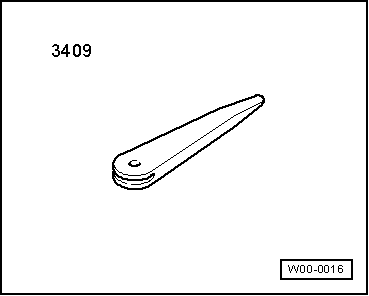
Switch off ignition and all electrical equipment and remove ignition key.
A bracket secures the display on the back of the front seats. The bracket does not have to be removed.
Cover (3) is fastened to rear of display (1). When removing and installing, first slide lugs (4) into slots (2) at bottom of display (1); then clip in all other lugs (arrows).
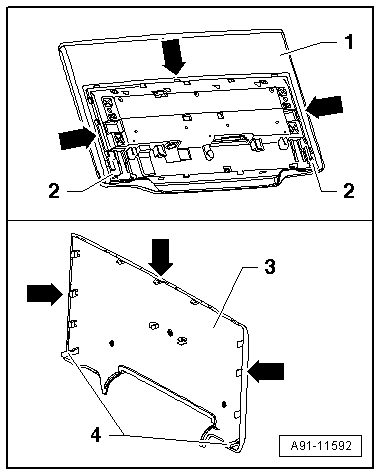
Use removal wedge 3409 to carefully unclip cover (2) from display (1)(arrows).
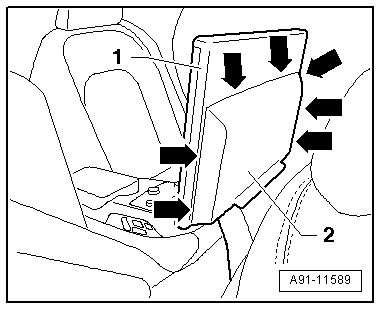
Display (1) is secured to retainer (4) with two bolts (arrows).
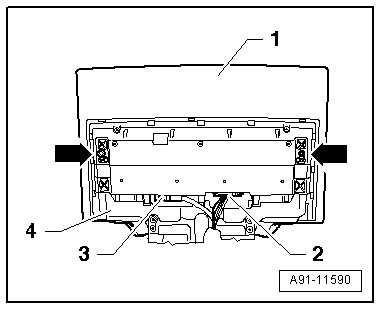
Unscrew bolts (2) and slide display (1) slightly upwards until connectors are accessible.
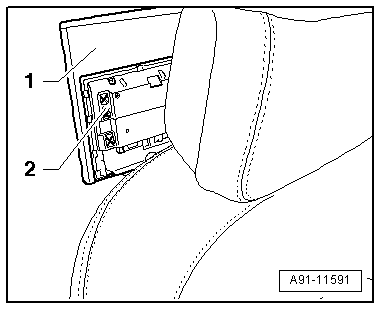
Release and unplug connectors (2) and (3) on reverse side of display (1).
Completely detach display upwards from bracket.
Install in reverse sequence of removal.
Cover (3) is fastened to rear of display (1). When removing and installing, first slide lugs (4) into slots (2) at bottom of display (1); then clip in all other lugs (arrows).
- Chapter“Overview of fitting locations - Rear Seat Entertainment system”
Parts & tools for this job For 2011 Audi A6
- TOOLDigital multimeterSearch: automotive digital multimeter
- PARTAssorted fuse kitSearch: car fuse assortment kit
- TOOLWire crimper and connector kitSearch: wire crimper connector kit
As an Amazon Associate we earn from qualifying purchases.