
Removing and installing brake disc (1LP)
- Make
- Audi
- Model
- A7 Sportback
- Year
- 2010–2018
- Section
- Front brakes › Removing and installing brake disc (1LP)
‹ Prev Removing and installing brake disc - steel version brakes (1LA / 1LJ / 1LF / 1LL / 1LU / 1LM / 1LX)Next › Removing and installing brake disc - ceramic brakes (1LN / 1LW)
Brake systemRemoving and installing brake disc (1LP)
Removing and installing brake disc (1LP)
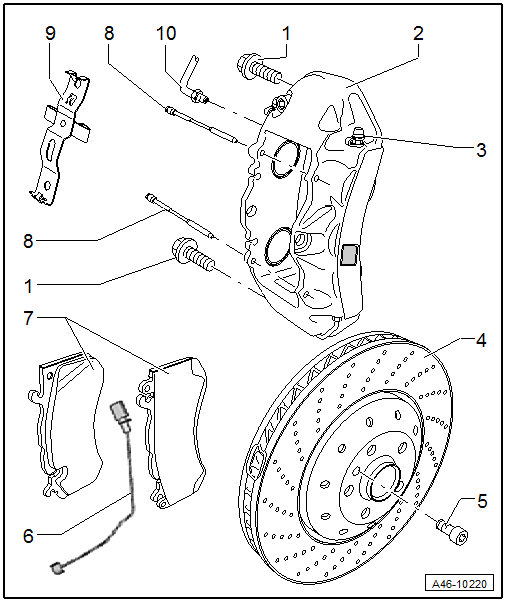
Remove brake caliper.
Remove locating bolt (5) from brake disc, holding brake disc in position.
Take brake disc off wheel hub.
Note
- Take care to keep the brake disc straight when taking it off the wheel hub.
Clean contact surfaces of wheel hub and brake disc and remove corrosion.
Fit brake disc onto wheel hub.
Note
- Take care to keep the brake disc straight when fitting it onto the wheel hub.
Screw in locating bolt (5) and tighten.
Install brake caliper.
Warning Risk of accident!
- Firmly depress the brake pedal several times with the vehicle stationary, so that the brake pads are properly seated in their normal operating position.
- Make sure that the brakes work properly before the vehicle is driven on the road.
‹ Prev Removing and installing brake disc - steel version brakes (1LA / 1LJ / 1LF / 1LL / 1LU / 1LM / 1LX)Next › Removing and installing brake disc - ceramic brakes (1LN / 1LW)
Parts & tools for this job For 2010 Audi A7
- PARTFront brake padsSearch: Audi A7 2010 front brake pads
- TOOLCaliper piston rewind toolSearch: brake caliper piston rewind tool
- FLUIDBrake fluidSearch: brake fluid
As an Amazon Associate we earn from qualifying purchases.