
Removing and installing bumper aerials
- Make
- Audi
- Model
- A7 Sportback
- Year
- 2010–2018
- Section
- Aerial systems › Removing and installing bumper aerials
Removing and installing bumper aerials
LTE aerial 1 R297 / GSM aerial 2 R267 are located behind rear bumper trim.
Switch off ignition and all electrical equipment and remove ignition key.
Remove rear bumper cover General body repairs, exteriorRep. gr.63Bumper (rear); Removing and installing bumper cover.
LTE aerial 1 R297 on rear bumper (right-side)
Release and unplug connector (5) for LTE aerial 1 R297(1).
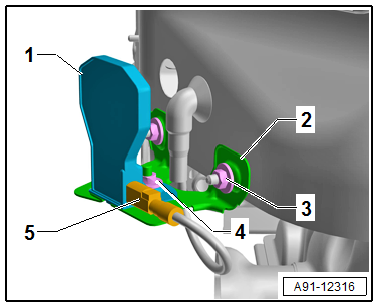
Unscrew nut (4) for LTE aerial 1 R297(1).
Detach LTE aerial 1 R297(1) from bracket (2).
Remove nuts (3) for bracket (2).
Detach bracket (2) from body.
GSM aerial R205 on rear bumper (left-side)
Release and unplug connector (5) for GSM aerial R205(1).
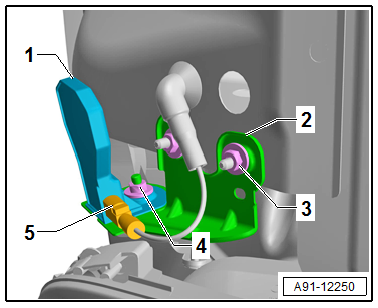
Unscrew nut (4) for GSM aerial R205(1).
Detach GSM aerial R205(1) from bracket (2).
Remove nuts (3) for bracket (2).
Detach bracket (2) from body.
Install in reverse sequence of removal.
- Chapter“Overview of fitting locations - aerial systems”
Parts & tools for this job For 2010 Audi A7
- TOOLTrim removal tool kitSearch: trim removal tool kit
- PARTTouch-up paintSearch: Audi touch up paint
- PARTPanel clip assortmentSearch: Audi panel clips assortment
As an Amazon Associate we earn from qualifying purchases.