
Removing and installing hazard warning lights button E229
- Make
- Audi
- Model
- A7 Sportback
- Year
- 2010–2018
- Section
- Controls › Removing and installing hazard warning lights button E229
‹ Prev Removing and installing switches in dash panelNext › Removing and installing valet parking button E536
Electrical systemRemoving and installing hazard warning lights button E229
Removing and installing hazard warning lights button E229
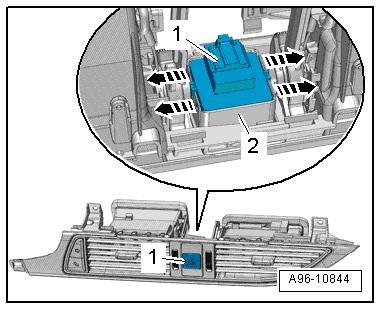
Remove dash panel vent (centre) General body repairs, interiorRep. gr.70Dash panel; Removing and installing dash panel vent.
Release retaining tabs (arrows).
Press hazard warning lights button (1) out of mounting (2) towards rear.
Installation is carried out in the reverse order; note the following:
Press hazard warning lights button in until it engages audibly.
‹ Prev Removing and installing switches in dash panelNext › Removing and installing valet parking button E536
Parts & tools for this job For 2010 Audi A7
- TOOLDigital multimeterSearch: automotive digital multimeter
- PARTAssorted fuse kitSearch: car fuse assortment kit
- TOOLWire crimper and connector kitSearch: wire crimper connector kit
As an Amazon Associate we earn from qualifying purchases.