
Removing and installing selector lever position display Y26
- Make
- Audi
- Model
- A7 Sportback
- Year
- 2010–2018
- Section
- Lights › Removing and installing selector lever position display Y26
‹ Prev Removing and installing rear door storage compartment illumination bulb L170/ L171Next › Removing and installing bulb for illuminated centre armrest L157
Electrical systemRemoving and installing selector lever position display Y26
Removing and installing selector lever position display Y26
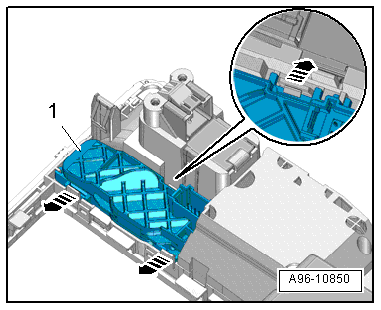
Remove multimedia system operating unit CommunicationRep. gr.91Infotainment system; Removing and installing multimedia system operating unit E380.
Release retaining tabs with a small screwdriver (arrows).
Detach selector lever position display (1) from operating unit.
Install in reverse order.
‹ Prev Removing and installing rear door storage compartment illumination bulb L170/ L171Next › Removing and installing bulb for illuminated centre armrest L157
Parts & tools for this job For 2010 Audi A7
- TOOLDigital multimeterSearch: automotive digital multimeter
- PARTAssorted fuse kitSearch: car fuse assortment kit
- TOOLWire crimper and connector kitSearch: wire crimper connector kit
As an Amazon Associate we earn from qualifying purchases.