
Removing and installing telephone and navigation system loudspeaker R39
- Make
- Audi
- Model
- A8 D3
- Year
- 2002–2010
- Section
- Mfcu › Removing and installing telephone and navigation system loudspeaker R39
‹ Prev Removing and installing rear right microphone R145Next › Removing and installing fax unit control unit
Electrical: CommunicationRemoving and installing telephone and navigation system loudspeaker R39
Removing and installing telephone and navigation system loudspeaker R39
Switch off all electrical equipment.
Remove ignition key.
Remove bottom B-pillar trim (right-side) General body repairs, interiorRep. Gr.70.
Unplug connectors and remove trim.
Unscrew ring (1) on outside of telephone and navigation systems loudspeaker R39(2) in direction of (arrow) and remove telephone and navigation systems loudspeaker R39(2) from trim towards front.
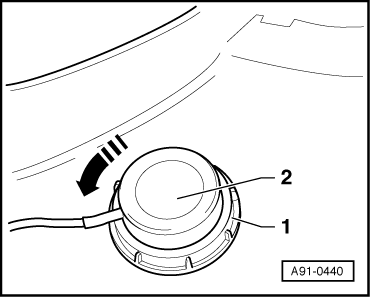
Installation is performed in reverse sequence.
‹ Prev Removing and installing rear right microphone R145Next › Removing and installing fax unit control unit
Parts & tools for this job For 2002 Audi A8
- TOOLDigital multimeterSearch: automotive digital multimeter
- PARTAssorted fuse kitSearch: car fuse assortment kit
- TOOLWire crimper and connector kitSearch: wire crimper connector kit
As an Amazon Associate we earn from qualifying purchases.