
Removing and installing roof aerial R216
- Make
- Audi
- Model
- A8 D3
- Year
- 2002–2010
- Section
- Radio system › Removing and installing roof aerial R216
Removing and installing roof aerial R216
From model year 2003 onwards a roof aerial R216 (telephone aerial R65/GPS aerial R50) is fitted.
Switch off all electrical equipment.
Remove ignition key.
Remove roof end trim General body repairs, interiorRep. Gr.70.
Remove C-pillar trim (left-side and right-side) General body repairs, interiorRep. Gr.70.
Remove rear interior light W43Electrical systemRep. Gr.96.
Pull down moulded headlining (rear) General body repairs, interiorRep. Gr.70.
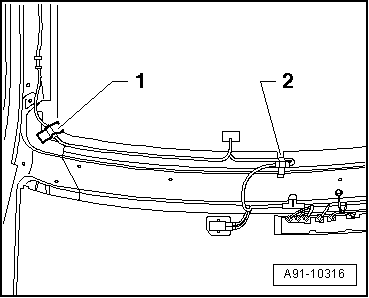
Unplug connectors of aerial wiring (1) and (2).
Unscrew nut (2) (7 Nm).
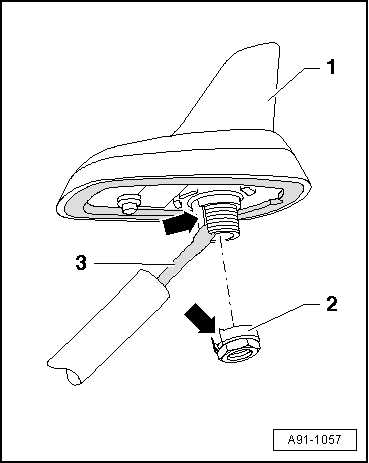
Lift roof aerial R216(1) off roof.
Guide in aerial wiring (3) and carefully fit roof aerial R216(1) onto roof.
Make sure that the aerial wiring (3) is fitted in the grooves (arrows) on the aerial base and securing nut so that it does not become pinched or crimped.
Tighten nut evenly to 7 Nm.
Make sure that the roof aerial R216 is fitted evenly on the roof.
Continue installation in reverse sequence.
Parts & tools for this job For 2002 Audi A8
- TOOLDigital multimeterSearch: automotive digital multimeter
- PARTAssorted fuse kitSearch: car fuse assortment kit
- TOOLWire crimper and connector kitSearch: wire crimper connector kit
As an Amazon Associate we earn from qualifying purchases.