
Checking headlight settings
- Make
- Audi
- Model
- A8 D3
- Year
- 2002–2010
- Section
- Halogen headlights › Checking headlight settings
Electrical systemChecking headlight settings
Checking headlight settings
Start engine.
Switch on dipped headlights.
Set vehicle level to normal.
To do so, press the function selector button “CAR” on the MMI operating unit. The main menu “adaptive air suspension” will appear.
Use the rotary pushbutton to select the “automatic” level.
Further information on the vehicle level can be found in the MMI Operating Manual
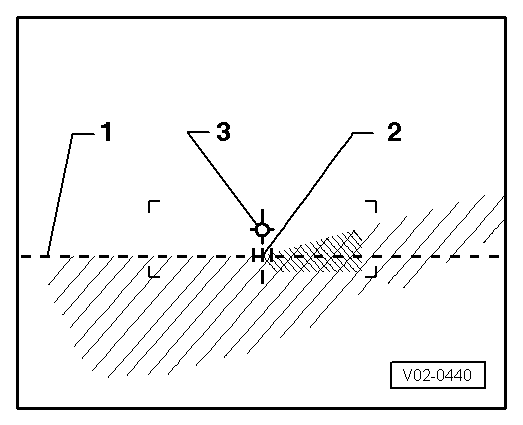
- The horizontal light-dark border should coincide with the setting line (1) of the test surface.
- The break-away point (2) between the horizontal section of the light-dark border on the left and the rising section on the right should coincide with the vertical line running through the central point (3). The bright spot in the centre of the beam should be to the right of the vertical line.
Note
- To make it easier to find the break-away point (2), cover and uncover the left half of the headlight (as seen in direction of travel) a few times. Then check the dipped beam again.
- If dipped beams have been adjusted correctly the centre point of the main beam should lie on central point (3).
- If using an old test screen with a 15 ° setting line, the adjustment procedure is the same as for the new screen. Disregard the 15° setting line to avoid incorrect settings.
If headlight setting is not OK, adjust headlights → Chapter.
Parts & tools for this job For 2002 Audi A8
- PARTReplacement bulbsSearch: Audi A8 2002 bulbs
- TOOLDigital multimeterSearch: automotive digital multimeter
As an Amazon Associate we earn from qualifying purchases.