
Removing and installing chip card reader control unit
- Make
- Audi
- Model
- Q3 8U
- Year
- 2011–2018
- Section
- Navigation system › Removing and installing chip card reader control unit
Removing and installing chip card reader control unit
The chip card reader control unit J676(1) is located in the glove box (2).
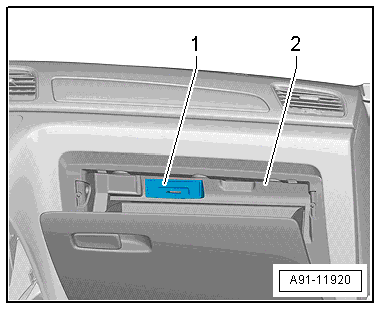
Switch off ignition and all electrical equipment and remove ignition key.
Remove glove box General body repairs, interiorRep. gr.68Shelves / trim panels; Removing and installing glove box.
Release and unplug connectors at chip card reader control unit J676.
Remove bolts (2) at bracket (1).
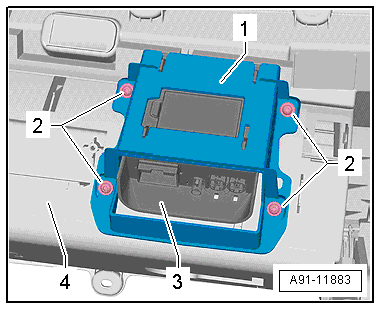
Detach bracket (1) from glove box (4) together with chip card reader control unit J676(3).
Pull chip card reader control unit J676 off bracket.
Installation is carried out in reverse sequence; note the following:
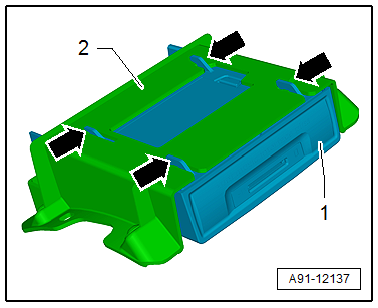
Slide chip card reader control unit J676(1) into bracket (2) until it engages audibly (arrows).
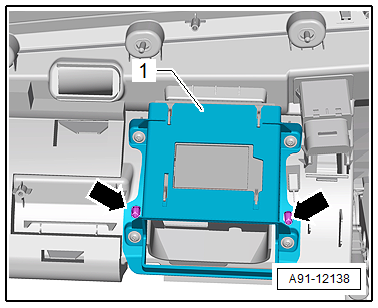
When fitting bracket (1), make sure that domes (arrows) are located correctly in bracket (1).
| Component | Tightening torque |
|---|---|
| Bolts, bracket | 4 Nm |
Parts & tools for this job For 2011 Audi Q3
- TOOLDigital multimeterSearch: automotive digital multimeter
- PARTAssorted fuse kitSearch: car fuse assortment kit
- TOOLWire crimper and connector kitSearch: wire crimper connector kit
As an Amazon Associate we earn from qualifying purchases.