
Removing and installing MMI radio, 8YQ
- Make
- Audi
- Model
- Q3 8U
- Year
- 2011–2018
- Section
- Radio › Removing and installing MMI radio, 8YQ
Removing and installing MMI radio, 8YQ
The radio R is located in the luggage compartment (left-side) behind the flap.
Note
- If control unit is to be renewed, select the “Replace control unit” function for appropriate control unit in Vehicle diagnostic tester.
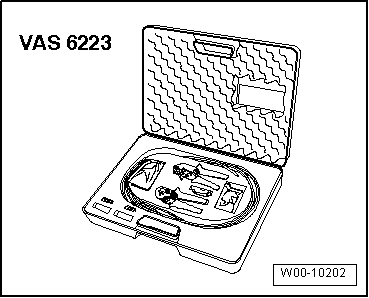
Switch off ignition and all electrical equipment and remove ignition key.
Remove cover on left in luggage compartment and remove luggage compartment floor covering.
The control unit bracket must be removed prior to removing the radio R.
Remove nuts (2) on bracket (1).
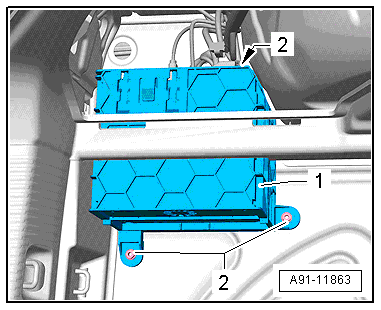
Swivel bracket (1) into luggage compartment until front side of radio R and TV tuner R78 are accessible.
Release and unplug all connectors on radio R and TV tuner R78.
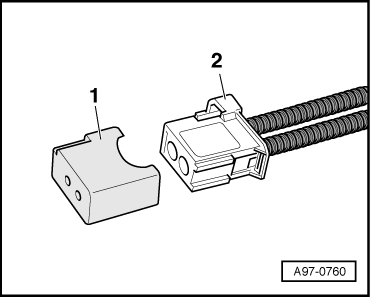
Fit protective cap for cable connector VAS 6223/9(1) onto MOST bus connector (2).
Press spring catches (arrow) on radio R(1) on both sides.
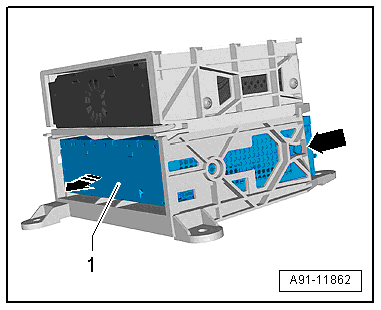
Pull radio R(1) to rear out of bracket (arrow).
Install in reverse sequence of removal.
- Chapter“Overview of fitting locations - infotainment system”
Parts & tools for this job For 2011 Audi Q3
- TOOLDigital multimeterSearch: automotive digital multimeter
- PARTAssorted fuse kitSearch: car fuse assortment kit
- TOOLWire crimper and connector kitSearch: wire crimper connector kit
As an Amazon Associate we earn from qualifying purchases.