
Installing dual clutch
- Make
- Audi
- Model
- Q5 Mk1
- Year
- 2008–2017
- Section
- Clutch › Installing dual clutch
Installing dual clutch
Installation is carried out in reverse sequence; note the following:
Note
- Renew O-ring and circlip.
Clean sealing surface on clutch cover.
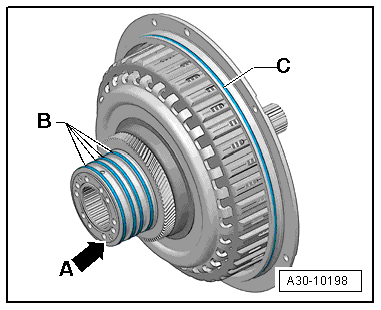
Turn rectangular section seals (B) on hub and check for freedom of movement and axial play.
Note
- If any of the rectangular section seals do not move freely, the dual clutch must not be fitted.
Clean gearbox housing in area of dual clutch and clean sealing surface.
Note
- Make sure that no particles of dirt fall into the gearbox when cleaning the housing.
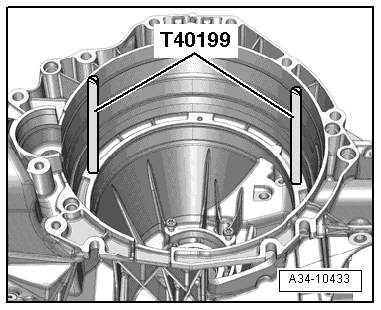
Screw centring tool T40199 into threaded holes in gearbox housing, as shown in illustration.
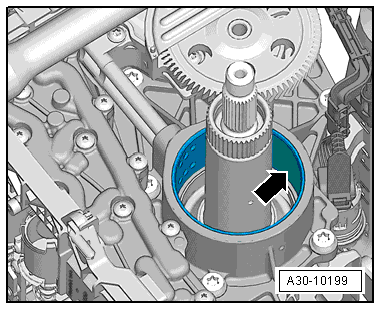
Check rotating port (arrow) in gearbox for scoring.
Lightly lubricate O-ring (C) and hub (B) of dual clutch with ATF before installation.
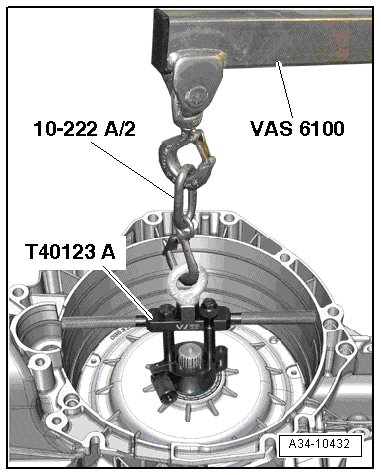
Insert dual clutch into gearbox housing, as shown in illustration (lift and rotate dual clutch slightly so that input shaft engages in splines on ATF pump and gearbox shafts).
Warning
- The new O-ring must not be crushed during installation.
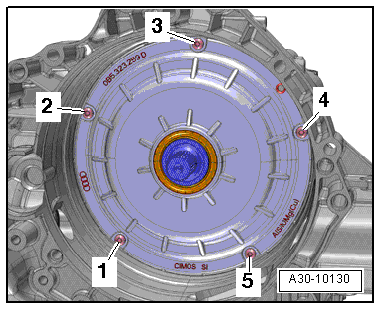
- It is important to tighten bolts (1 to 5) for the clutch cover in the correct sequence (Fig.).
Tighten bolts (1 to 5) for clutch cover to specified torque in specified sequence → Fig..
Renew oil seal for input shaft → Chapter.
Install flywheel → Chapter.
Fill up with ATF after installing gearbox 7-speed dual clutch gearboxRep. gr.34ATF; Draining and filling ATF.
After renewing dual clutch, run appropriate “Guided Function” on a vehicle diagnostic tester 7-speed dual clutch gearboxRep. gr.39Gearbox control system.Parts & tools for this job For 2008 Audi Q5
- PARTClutch kitSearch: Audi Q5 2008 clutch kit
- TOOLClutch alignment toolSearch: clutch alignment tool
- FLUIDGear oilSearch: Audi Q5 manual gearbox oil
As an Amazon Associate we earn from qualifying purchases.