
Renewing cover for rotary pushbutton
- Make
- Audi
- Model
- Q7 Mk2
- Year
- 2015–2023
- Section
- Infotainment system › Renewing cover for rotary pushbutton
Renewing cover for rotary pushbutton
If the cover for the rotary pushbutton (multimedia system operating unit E380) is damaged or scratched, it can be renewed using a replacement parts kit.
- Replacement parts kit Electronic parts catalogue “ETKA”
Switch off ignition and all electrical equipment and remove ignition key.
An adhesive strip from the replacement parts kit is required to pull off the cover.
First, thoroughly clean the cover. Remove protective film from adhesive strip.
Press adhesive strip (2) onto cover with your thumb.
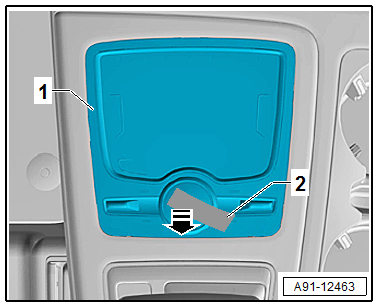
After waiting five seconds, remove the cover by abruptly pulling it vertically upwards (arrow). When doing this, counterhold the rotary pushbutton at the chrome ring.
Fit new cover on rotary pushbutton and carefully press it on using a cloth.
Ensure that the cover's centring lug is located correctly in the rotary pushbutton.
Parts & tools for this job For 2015 Audi Q7
- TOOLDigital multimeterSearch: automotive digital multimeter
- PARTAssorted fuse kitSearch: car fuse assortment kit
- TOOLWire crimper and connector kitSearch: wire crimper connector kit
As an Amazon Associate we earn from qualifying purchases.