
Calibrating overhead view camera
- Make
- Audi
- Model
- Q7 Mk2
- Year
- 2015–2023
- Section
- Overhead view camera › Calibrating overhead view camera
Calibrating overhead view camera
Vehicle must be on a level surface.
Ensure that the requirements for the calibration workplace/calibration area Anchor are met.
Ensure that the requirements for the vehicle are met Anchor.
Roll calibration unit VAS 721 001 out to the left and right sides of the vehicle.
Arrows (1) on calibration unit VAS 721 001 point in the direction of travel.
Fit retaining strips on front and rear of calibration unit VAS 721 001.
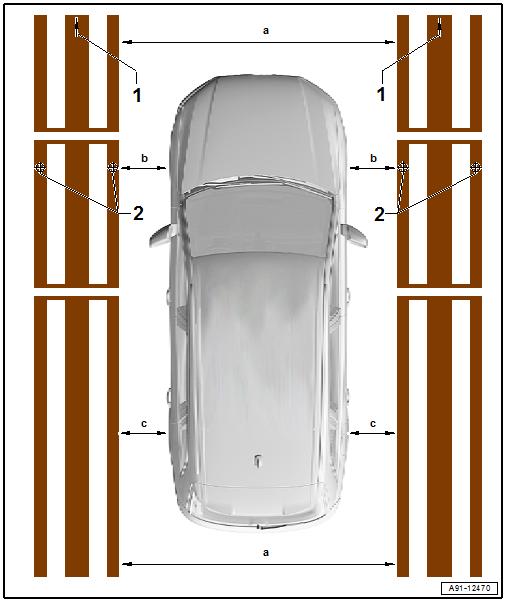
Align crosshairs (2) on calibration unit VAS 721 001 with the vehicle's front axle (centre of front wheel).
Align both calibration units so they are parallel. The vehicle must be located centrally between both calibration units.
Note the following dimension requirements when doing this:
Dimension (a) = 2000 to 2500 mm ± 5 mm (same at front and rear)Dimension (b) must be the same on both sidesDimension (c) must be the same on both sidesConnect Vehicle diagnostic tester.
Select Diagnosis mode and start diagnosis.
Select Test plan tab.
Select Own test then the following options one after the other:
- Body
- Electrical system
- 01 - Self-diagnosis compatible systems
- 6C - Control unit for overhead view camera | J928
- 6C - Control unit for overhead view camera, functions
- 6C - Calibration (Rep. gr. 91)
Further instructions are given by Vehicle diagnostic tester during calibration procedure.
Warning Make sure no light is reflected on calibration unit for overhead view camera VAS 6350/6.
Reflected light impairs the view of the cameras and therefore it may be impossible to perform calibration.
Parts & tools for this job For 2015 Audi Q7
- TOOLDigital multimeterSearch: automotive digital multimeter
- PARTAssorted fuse kitSearch: car fuse assortment kit
- TOOLWire crimper and connector kitSearch: wire crimper connector kit
As an Amazon Associate we earn from qualifying purchases.