
Removing and installing brake pad wear sender
- Make
- Audi
- Model
- R8 Mk1
- Year
- 2007–2015
- Section
- Rear brakes › Removing and installing brake pad wear sender
Removing and installing brake pad wear sender
Note
- The brake pad wear sender cannot be removed without damage.
Remove corresponding rear wheel; on vehicles with ceramic brakes, observe precautions regarding ceramic brakes Running gear, front-wheel drive and four-wheel driveRep. gr.44Wheels and tyres.
Unplug electrical connector (2) for pad wear sender.
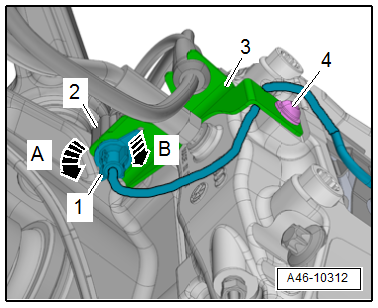
Release electrical connector (1) for pad wear sender from bracket (arrow B) and at the same time turn 90° (arrow A).
Remove bolt (4) and push bracket (3) to one side.
Unclip electrical wire for pad wear sender at pad retaining spring (arrow).
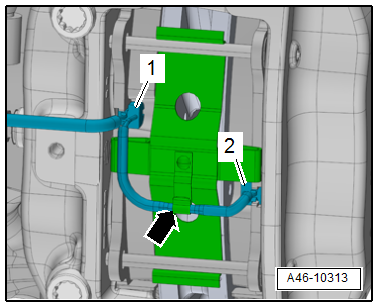
Detach contacts (1 and 2) of pad wear sender from brake pads using pliers.
Insert contacts (1 and 2) of pad wear sender into brake pads so that they engage.
The free wire connection faces towards the inside of the vehicle.Note
- Make sure the contacts for the pad wear sender are properly seated in the brake pads.
Secure electrical wire for pad wear sender; to do so, attach it at retainer (arrow) as shown in illustration.
Guide electrical wire (6) for brake pad wear sender towards rear, as shown in illustration, and tighten bolt (5) for bracket (4)
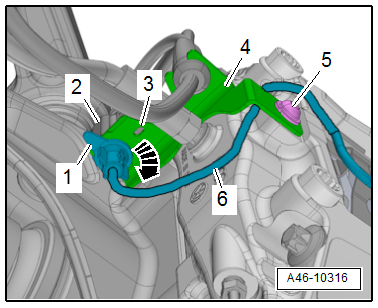
Locate electrical connector in installation position and turn in direction of (arrow) until tab (1) engages in hole (3) in bracket.
Plug in electrical connector (2).
Fit rear wheel; on vehicles with ceramic brakes, observe precautions regarding ceramic brakes Running gear, front-wheel drive and four-wheel driveRep. gr.44Wheels and tyres.
Parts & tools for this job For 2007 Audi R8
- PARTRear brake padsSearch: Audi R8 2007 rear brake pads
- TOOLCaliper piston rewind toolSearch: brake caliper piston rewind tool
- FLUIDBrake fluidSearch: brake fluid
As an Amazon Associate we earn from qualifying purchases.