
Removing and installing brake light switch
- Make
- Audi
- Model
- R8 Mk1
- Year
- 2007–2015
- Section
- Sensors › Removing and installing brake light switch
Removing and installing brake light switch
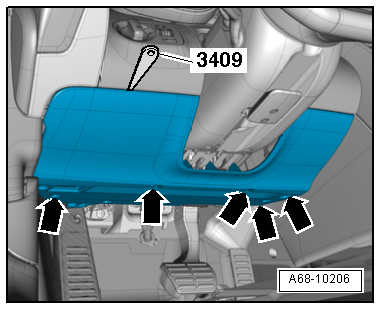
Note
- Re-install cable ties in original position.
Remove dash panel cover (driver side) General body repairs, interiorRep. gr.68Shelves/trim panels; Removing and installing dash panel cover (driver side).
Unplug electrical connector (2) and move electrical wire clear.
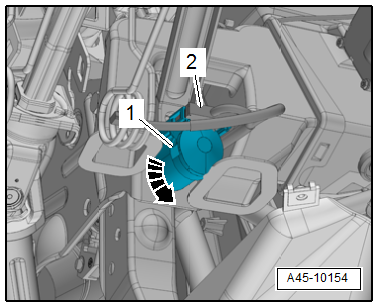
Turn brake light switch F/brake pedal switch F47(item 1) 45° anti-clockwise (arrow) and detach.
Installation is performed in reverse sequence; note the following:
Note
- The brake push rod must be attached to the brake pedal.
- Do not press the brake pedal while installing the switch.
- The plunger adjusts itself automatically when the brake pedal switch is inserted.
Pull out plunger on brake light switch F/brake pedal switch F47 as far as it will go (arrow).
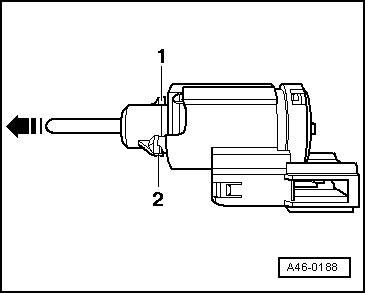
Note
- (Items 1, 2) can be disregarded.
Fit retainer tabs (3) on brake light switch F/brake pedal switch F47(item 1) into recesses (2) on mounting bracket for brake pedal.
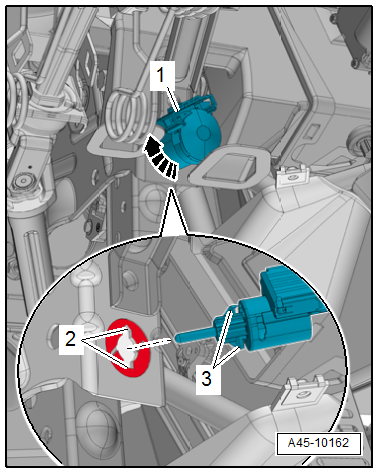
Secure brake light switch F/brake pedal switch F47 by turning 45° clockwise (arrow).
Install dash panel cover (driver side) General body repairs, interiorRep. gr.68Shelves/trim panels; Removing and installing dash panel cover (driver side).
Note
- Make sure that the brake light switch works properly before the vehicle is driven on the road.
Parts & tools for this job For 2007 Audi R8
- TOOLOBD2 scannerSearch: OBD2 scanner
- TOOLDigital multimeterSearch: automotive digital multimeter
- TOOLBack-probe test leadsSearch: back probe test leads
As an Amazon Associate we earn from qualifying purchases.