
Removing and installing GPS aerial R50
- Make
- Audi
- Model
- R8 Mk1
- Year
- 2007–2015
- Section
- Aerial systems › Removing and installing GPS aerial R50
‹ Prev Removing and installing aerial amplifier R24/aerial amplifier 4 R113Next › Removing and installing radio, telephone and navigation system aerial R52 (Coupé)
Electrical: CommunicationRemoving and installing GPS aerial R50
Removing and installing GPS aerial R50
GPS aerial R50 is located beneath dash panel (centre).
For removing and installing, dash panel must be removed.
Remove dash panel General body repairs, interiorRep. gr.70Dash panel; Removing and installing dash panel.
Remove dash panel cover General body repairs, interiorRep. gr.70Dash panel; Removing and installing dash panel cover.
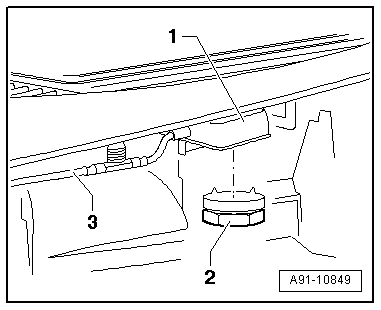
Release and unplug connector (3).
Cut through all cable ties up to GPS aerial R50(1).
Remove nut (2) on GPS aerial R50(1).
Remove GPS aerial R50(1).
Install in reverse sequence of removal.
- Chapter“Overview of fitting locations - aerial systems”
‹ Prev Removing and installing aerial amplifier R24/aerial amplifier 4 R113Next › Removing and installing radio, telephone and navigation system aerial R52 (Coupé)
Parts & tools for this job For 2007 Audi R8
- TOOLDigital multimeterSearch: automotive digital multimeter
- PARTAssorted fuse kitSearch: car fuse assortment kit
- TOOLWire crimper and connector kitSearch: wire crimper connector kit
As an Amazon Associate we earn from qualifying purchases.