
Removing and installing satellite radio R146 (Spyder)
- Make
- Audi
- Model
- R8 Mk1
- Year
- 2007–2015
- Section
- Radio › Removing and installing satellite radio R146 (Spyder)
Removing and installing satellite radio R146 (Spyder)
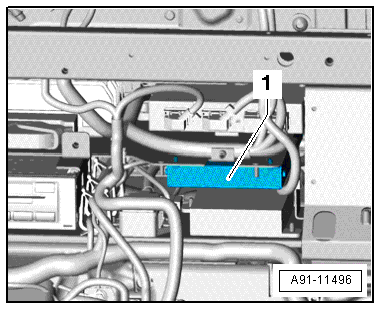
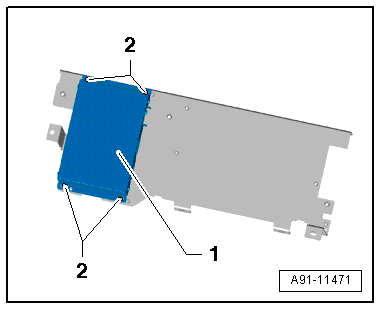
The satellite radio R146(1) is located behind the back panel (left-side).
Note
- If control unit is to be renewed, select the “Replace control unit” function for appropriate control unit in Vehicle diagnostic tester.
Switch off ignition and all electrical equipment and remove ignition key.
The back panel trim, the rear storage compartment, the front cover and the back panel end trim must be removed prior to removing the satellite radio R146.
Remove back panel trim and rear storage compartment General body repairs, interiorRep. gr.70Passenger compartment trim panels - R8 Coupé; Exploded view of passenger compartment trim panels.
Remove cover (front) and back panel end trim General body repairs, interiorRep. gr.70Passenger compartment trim panels - R8 Coupé; Exploded view of passenger compartment trim panels.
Then remove the fuse carrier and the top cover.
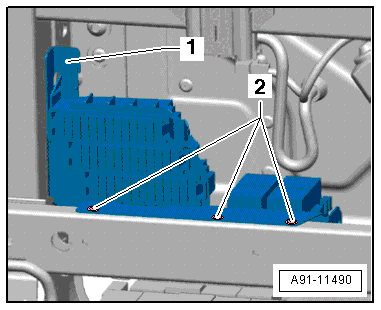
Unscrew bolts (2) on fuse carrier (1) and place fuse carrier (1) aside.
Release and unplug connectors of control units on top cover.
First remove bolts (4) and nuts (2) from top cover (1).
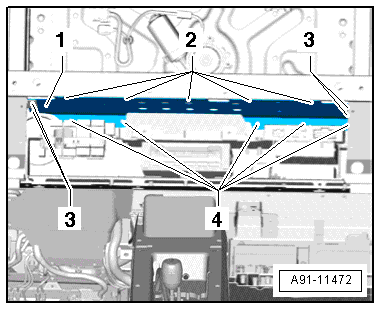
Then remove bolts (3) and take top cover (1) out of back panel.
Then proceed with removing the bracket with the control units.
Release and unplug connectors of control units on bracket (2).
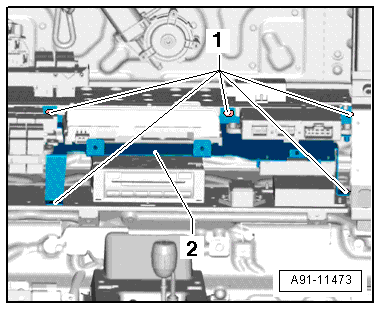
Remove bolts (1) on bracket (2) and swivel bracket (2) upwards.
Release and unplug connectors on satellite radio R146.
Remove bracket (2).
Now the satellite radio R146 can be removed.
Unscrew nuts (2) on satellite radio R146(1) and detach satellite radio R146(1) from bracket.
Installation is carried out in reverse sequence; note the following:
Activate satellite radio R146Chapter.
- Chapter“Overview of fitting locations - radio, USA”
Parts & tools for this job For 2007 Audi R8
- TOOLDigital multimeterSearch: automotive digital multimeter
- PARTAssorted fuse kitSearch: car fuse assortment kit
- TOOLWire crimper and connector kitSearch: wire crimper connector kit
As an Amazon Associate we earn from qualifying purchases.