
Removing and installing parking brake switch
- Make
- Audi
- Model
- TT Mk2
- Year
- 2006–2014
- Section
- Parking brake › Removing and installing parking brake switch
Brake systemRemoving and installing parking brake switch
Removing and installing parking brake switch
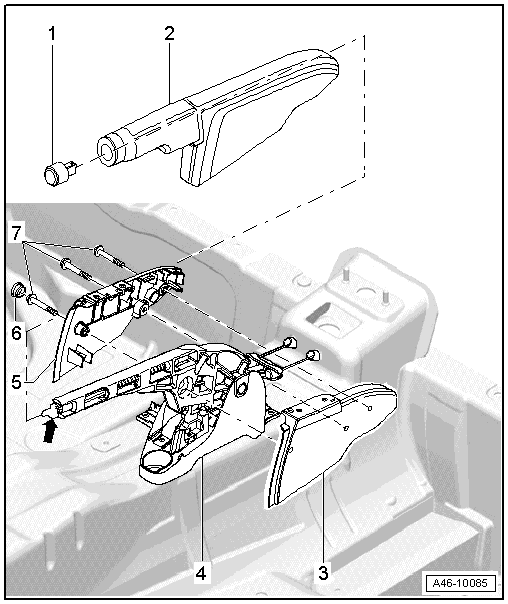
Depending on type of equipment3Trim (left-side)
Depending on type of equipment4Handbrake switch
For handbrake warning lamp in instrument cluster5Trim (right-side)
Depending on type of equipment6Protective cap7Bolt
0.7 Nm
Remove centre console trim General body repairs, interiorRep. gr.68Centre console; Exploded view - centre console.
Detach locking knob (1).
Note
- Note different versions of handbrake trim.
One-piece trim for handbrake (2): release and pull off to front.
Two-piece trim for handbrake: release handle and pull off to front.
Remove two-piece trim for handbrake lever.
Unclip handbrake switch (4).
Unplug connector.
Installation is carried out in the reverse sequence.
Parts & tools for this job For 2006 Audi TT
- TOOLOBD2 scannerSearch: OBD2 scanner
- TOOLDigital multimeterSearch: automotive digital multimeter
- TOOLBack-probe test leadsSearch: back probe test leads
As an Amazon Associate we earn from qualifying purchases.