
Removing and installing telephone bracket R126
- Make
- Audi
- Model
- TT Mk2
- Year
- 2006–2014
- Section
- Telephone system › Removing and installing telephone bracket R126
‹ Prev Removing and installing aerial amplifier for mobile telephone R86, RoadsterNext › Removing and installing telephone transmitter and receiver unit
Electrical: CommunicationRemoving and installing telephone bracket R126
Removing and installing telephone bracket R126
Switch off ignition and all electrical equipment and remove ignition key.
Remove mobile telephone R54 from telephone bracket R126 and disengage bracket.
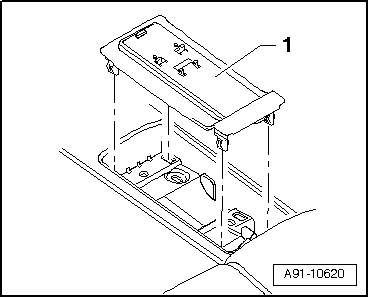
Pry out telephone bracket R126(1) upwards.
Remove bolts (4) on underside of base plate (3).
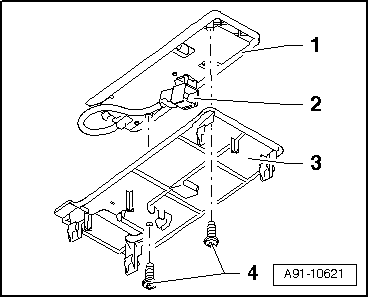
Unplug electrical connector (2) at telephone bracket R126(1).
Lift out telephone bracket R126(1).
Installation is performed in reverse sequence.
- Chapter“Overview of fitting locations - telephone system, Coupé”
- Chapter“Overview of fitting locations - telephone system, Coupé (USA)”
- Chapter“Overview of fitting locations - telephone system, Roadster”
- Chapter“Overview of fitting locations - telephone system, Roadster (USA)”
‹ Prev Removing and installing aerial amplifier for mobile telephone R86, RoadsterNext › Removing and installing telephone transmitter and receiver unit
Parts & tools for this job For 2006 Audi TT
- TOOLDigital multimeterSearch: automotive digital multimeter
- PARTAssorted fuse kitSearch: car fuse assortment kit
- TOOLWire crimper and connector kitSearch: wire crimper connector kit
As an Amazon Associate we earn from qualifying purchases.