
Removing and installing glove compartment light switch E26
- Make
- Audi
- Model
- TT Mk2
- Year
- 2006–2014
- Section
- Controls › Removing and installing glove compartment light switch E26
‹ Prev Removing and installing daytime running lights switch E579Next › Removing and installing adjustable rear spoiler switch E127
Electrical systemRemoving and installing glove compartment light switch E26
Removing and installing glove compartment light switch E26
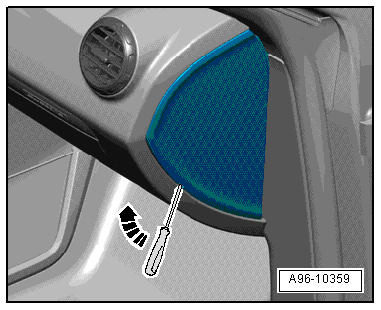
Switch off ignition and take out ignition key.
Use screwdriver to pry off dash panel end trim (arrow).
If fitted, remove aerial amplifier for mobile telephone R86CommunicationRep. gr.91Telephone system; Removing and installing aerial amplifier for mobile telephone R86.
Unplug electrical connector (1).
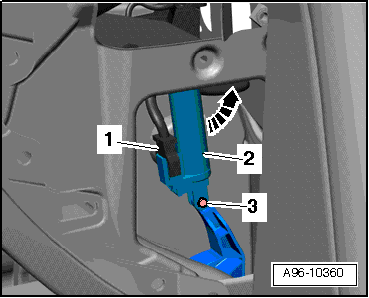
Pull out hinge pin (3).
Release switch (2) in anti-clockwise direction (arrow) and detach.
Install in reverse order.
‹ Prev Removing and installing daytime running lights switch E579Next › Removing and installing adjustable rear spoiler switch E127
Parts & tools for this job For 2006 Audi TT
- TOOLOBD2 scannerSearch: OBD2 scanner
- TOOLDigital multimeterSearch: automotive digital multimeter
- TOOLBack-probe test leadsSearch: back probe test leads
As an Amazon Associate we earn from qualifying purchases.