
Removing and installing brake light switch
- Make
- Audi
- Model
- TT Mk3
- Year
- 2014–2023
- Section
- Sensors › Removing and installing brake light switch
‹ Prev Exploded view - rear wheel speed sensor, vehicles with four-wheel driveNext › Removing and installing front wheel speed sensor G45/ G47
Brake systemRemoving and installing brake light switch
Removing and installing brake light switch
Note
- Fitting location → Chapter
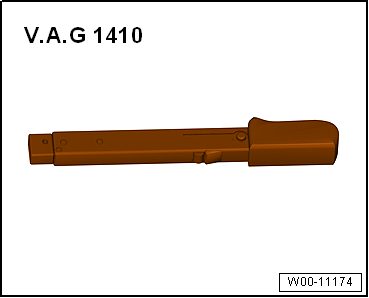
Remove engine cover panel Rep. gr.10Engine cover panel; Removing and installing engine cover panel.
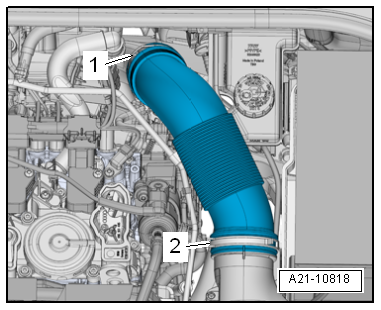
Release hose clips (1, 2) and remove air intake pipe.
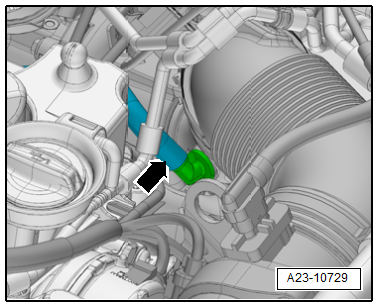
Disconnect vacuum hose (arrow) and move clear.
Move vacuum hoses clear (arrows).
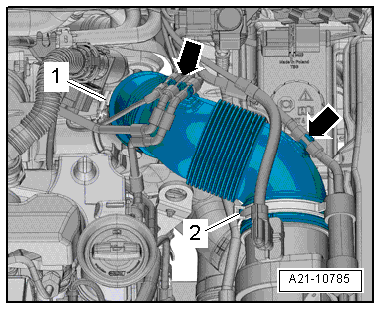
Release hose clips (1, 2) and remove air intake pipe.
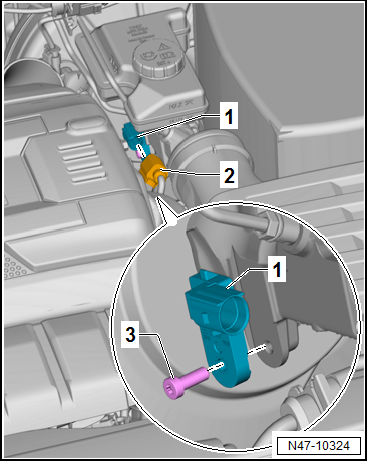
Unplug electrical connector (2).
Remove bolt (3).
Detach brake light switch F(item 1) from brake master cylinder.
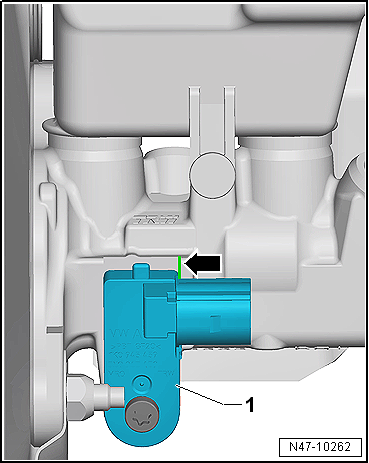
Installation is performed in reverse sequence; note the following:
Brake light switch (1) must make contact with edge (arrow) of brake master cylinder.- Item
- Rep. gr.21Charge air system; Exploded view - hose connections for charge air system
‹ Prev Exploded view - rear wheel speed sensor, vehicles with four-wheel driveNext › Removing and installing front wheel speed sensor G45/ G47
Parts & tools for this job For 2014 Audi TT
- TOOLOBD2 scannerSearch: OBD2 scanner
- TOOLDigital multimeterSearch: automotive digital multimeter
- TOOLBack-probe test leadsSearch: back probe test leads
As an Amazon Associate we earn from qualifying purchases.