
Removing and installing light switch E1
- Make
- Audi
- Model
- TT Mk3
- Year
- 2014–2023
- Section
- Controls › Removing and installing light switch E1
‹ Prev Overview of fitting locations - controls in roof trim, part 2Next › Removing and installing switches in dash panel
Electrical systemRemoving and installing light switch E1
Removing and installing light switch E1
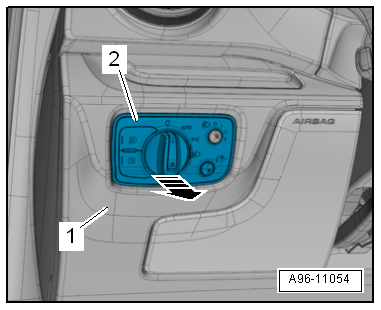
Turn light switch to position “0”.
Press light switch (2) out of dash panel cover (driver's side) (1)(arrow).
Note
- If the light switch cannot be removed in the way described, remove dash panel cover (side) on driver side General body repairs, interiorRep. gr.70Dash panel; Removing and installing dash panel cover (side). Press light switch out of dash panel cover (driver's side) from rear.
Unplug electrical connectors.
Installation is carried out in the reverse order; note the following:
Press light switch into dash panel cover (driver's side) until catch engages.
‹ Prev Overview of fitting locations - controls in roof trim, part 2Next › Removing and installing switches in dash panel
Parts & tools for this job For 2014 Audi TT
- TOOLOBD2 scannerSearch: OBD2 scanner
- TOOLDigital multimeterSearch: automotive digital multimeter
- TOOLBack-probe test leadsSearch: back probe test leads
As an Amazon Associate we earn from qualifying purchases.