
Presentation: Instrument panel
- Make
- Citroën
- Model
- C2 Factory Workshop Manual
- Year
- 2003–2009
- Section
- Instrument panel › Presentation: Instrument panel
Presentation: Instrument panel
1. Instrumentation
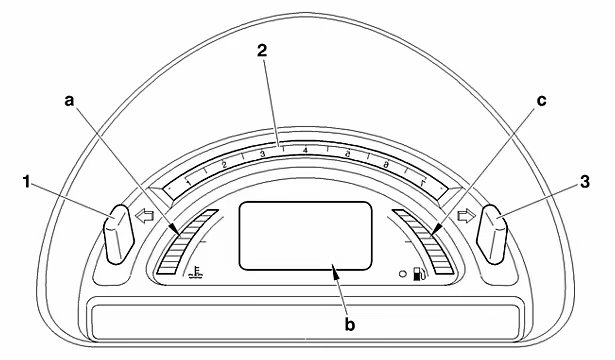
| Reference | Components |
|---|---|
| 1 | Dashboard lighting rheostat |
| 2 | tachometer |
| 3 | Total/partial mileage display and maintenance indicator reset button |
| "a" | Coolant temperature indicator |
| "b" | Liquid crystal display |
| "c" | Fuel level indicator |
2. Liquid crystal display
The liquid crystal display controls several functions and displays them in the following order:
- Maintenance indicator
- Oil gauge
- Milometer and tripmeter
- Trip computer (according to vehicle equipment)
3. Trip computer
3.1. Special feature
If the vehicle has a clock or multifunction screen type A, the trip computer is incorporated in the liquid crystal screen of the instrument panel.
In all other cases (multifunction screen type B, C, Ct, Dt), the trip computer is incorporated in the multifunction screen.
N.B.: There are no specific Part Nos. for instrument panels with and without trip computer.
3.2. Scrolling of the trip computer menus
The trip computer gives the following information:
- Milometer
- Tripmeter
- Range
- Current consumption
- Instantaneous consumption in the event of an invalid value
- Average consumption
- Average consumption in the event of an invalid value
- Average speed
- Fuel low alert
If the vehicle is not equipped with a radio control stalk, the trip computer scroll button is located at the end of the wash/wipe control stalk.
If the vehicle is equipped with a radio control stalk, the trip computer scroll button replaces the audio source change button (at the end of the wash/wipe control stalk).
A long press on the trip computer scroll button resets average consumption and average speed to zero.
4. Warning lamps
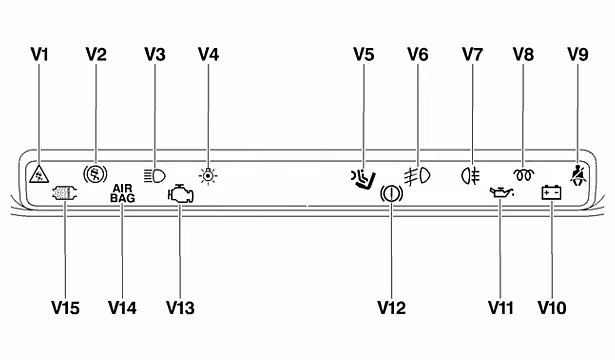
| No. of warning lamp | Warning lamps | Information |
|---|---|---|
| V1 | ESP | ESP system regulation |
| ESP fault | ||
| ESP deactivated | ||
| V2 | ABS | ABS fault |
| V3 | main beams | - |
| V4 | side lamps | - |
| V5 | Passenger airbag | Passenger’s airbag deactivated |
| V6 | Front foglamps | - |
| V7 | rear foglamps | - |
| V8 | Diesel pre-heating | Diesel pre-heating |
| V9 | Driver’s seat belt switch | Driver’s seat belt not fastened |
| V10 | Charge warning lamp | Charge fault |
| V11 | Oil alert | Oil pressure fault |
| V12 | Brake alert | Brake fluid level |
| Electronic brakeforce distribution fault | ||
| Parking brake | ||
| V13 | Engine fault/EOBD fault/serious emissions fault | - |
| V14 | Airbags | - |
| V15 | Particulate emission filter fault | - |
5. Allocation of instrument panel channels
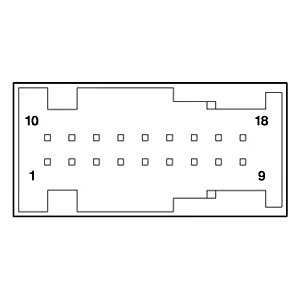
| -way | Description |
|---|---|
| 1 | DATA VAN signal |
| 2 | Hazard warning lamps switch input |
| 3 | DATA B VAN signal |
| 4 | Central locking/unlocking switch input |
| 5 | Heated rear screen switch input |
| 6 | - |
| 7 | COMFORT VAN + |
| 8 | Overspeed control switch input (activation, deactivation, memorisation of required speed) |
| 9 | Earth |
| 10 | DATA VAN signal |
| 11 | Hazard lamps switch LED lighting output |
| 12 | DATA B VAN signal |
| 13 | - |
| 14 | Heated rear screen switch LED lighting output |
| 15 | Auto/sensodrive switch |
| 16 | - |
| 17 | Overspeed control switch LED lighting output (activation, deactivation, memorisation of required speed) |
| 18 | Air conditioning activation/cut-off switch input |
The instrument panel receives information from the following buttons:
- Hazard warning lamps button
- Central locking/unlocking button
- Heated rear screen button
- Air conditioning activation/cut-off button
- Overspeed control button (activation, deactivation, memorisation of required speed)
The instrument panel controls:
- The lighting of the hazard lamps button LED
- The lighting of the sensodrive gearbox LED
- The lighting of the heated rear screen button LED
- The lighting of the overspeed control button LED
Parts & tools for this job For 2003 Citroën C2
- TOOLTorque wrenchSearch: 3/8 inch torque wrench
- TOOLSocket setSearch: socket set metric
- BOOKHaynes manualSearch: Haynes manual Citroën C2
As an Amazon Associate we earn from qualifying purchases.