
Presentation: Audio system
- Make
- Citroën
- Model
- C2 Factory Workshop Manual
- Year
- 2003–2009
- Section
- Display systems › Presentation: Audio system
Instruments and warning lampsPresentation: Audio system
Presentation: Audio system
1. Foreword
The vehicle can be equipped with the following components:
- Audio system (with cassette player, with CD player, or with carphone)
- Compact disc changer
- Audio system command integrated in the switching module under the steering wheel
The audio systems can be divided into the 3 following types.
| name | Description |
|---|---|
| RB3 | Radio receiver with mechanical cassette player |
| RD3 | Radio receiver with compact disc player |
| RT3 | Radio receiver with GSM telephone |
These 3 radio types are linked to the multifunction screen and can be associated with a control under the steering wheel.
The radios also have a CD changer input.
2. General synopsis
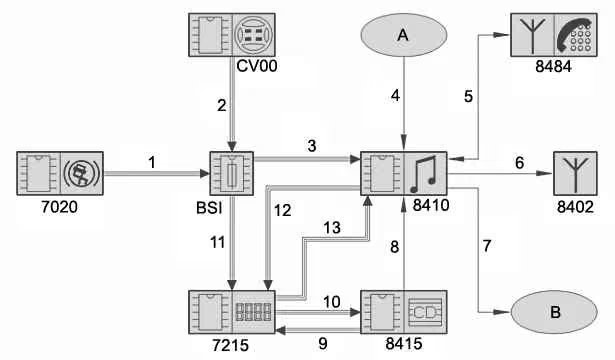
Key:
- Single arrow: Wire connection
- Triple arrow: Multiplexed connection
| Key | |
|---|---|
| A | External mute input |
| B | speakers |
| BSI | Built-in systems interface |
| CV00 | Switch module at the steering wheel |
| 7215 | multifunction screen |
| 8402 | radio antenna |
| 8484 | Carphone aerial |
| 8410 | Audio system |
| 8415 | Compact disc changer |
| 7020 | ABS or ESP ECU (according to model) |
| Connections | ||
|---|---|---|
| No. of link | signal | Nature of signal |
| 1 | Vehicle speed information | CAN |
| 2 | Status of the user controls | VAN CAR1 |
| 3 | Vehicle speed information | Comfort VAN |
| 4 | External mute input signal | Analogue |
| 5 | GSM transmission / reception signal | Analogue |
| 6 | Radio reception signal | Analogue |
| 7 | Output signal from the radio (amplified) | Analogue |
| 8 | Audio signal: Playing of CDs | Analogue |
| 9 | Status of the CD changer control | Comfort VAN |
| 10 | CD changer control | Comfort VAN |
| 11 | Status of the user controls | Comfort VAN |
| 12 | Radio status and request to change the radio status (general, tuner, cassette, CD etc.) | Comfort VAN |
| 13 | Controls for the radio (tuner, source, volume, audio, CD, cassette etc.) | Comfort VAN |
3. Description of the audio components
3.1. Audio system RB3
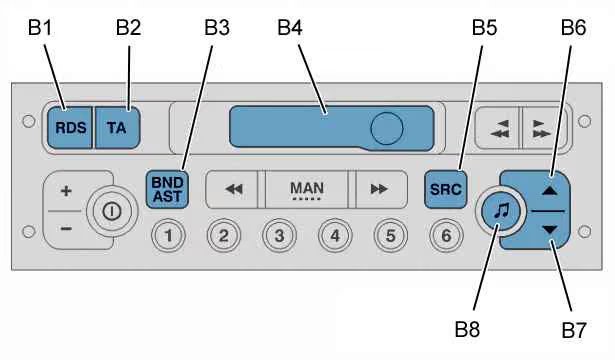
| Key | |
|---|---|
| B1 | Station search activation button (RDS) |
| B2 | Traffic information activation button |
| B3 | Memory and frequency band selector. Automatic memorisation button |
| B4 | Cassette housing |
| B5 | Source selection (radio, cassette or CD changer) |
| B6 | Increasing audio adjustment button |
| B7 | Decreasing audio adjustment button |
| B8 | Audio setting function recall button |
3.2. Audio system RD3
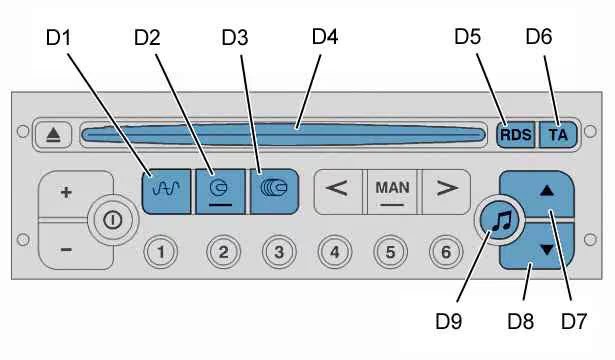
| Key | |
|---|---|
| D1 | Memory and frequency band selector. Automatic memorisation button |
| D2 | CD mode selection button |
| D3 | CD changer mode selection button |
| D4 | CD insertion |
| D5 | Station search activation button (RDS) |
| D6 | Traffic information activation button |
| D7 | Increasing audio adjustment button |
| D8 | Decreasing audio adjustment button |
| D9 | Audio setting function recall button |
3.3. Audio system RT3
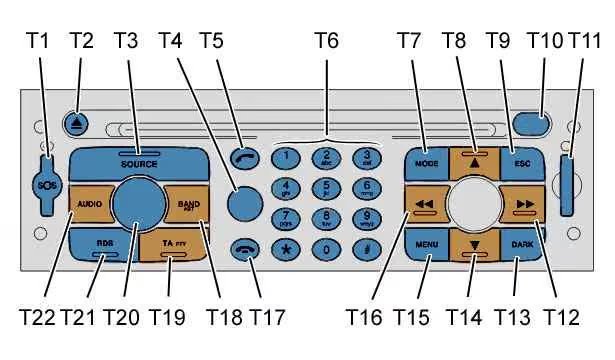
| Key | |
|---|---|
| T1 | Emergency call button (press for between 2 and 8 seconds) |
| T2 | CD ejection button |
| T3 | Source selection button. (press for more than 2 seconds) Mute/deactivation of the mute function |
| T4 | Access to "Citroën" services menu. (press for more than 2 seconds): "Citroën" direct call |
| T5 | Telephone pick-up button. Contextual menu display button (telephone). (press for more than 2 seconds): Mike cut/activation (secret mode) |
| T6 | Telephone keypad button. CD or CD changer selection button (from 1 to 6) |
| T7 | Change of current display button. (press for more than 2 seconds): Main menu display |
| T8 | Higher frequency adjustment button, sequential or continuous (long press). Select next CD button (CD changer) |
| T9 | Current operation cancellation button. (press for more than 2 seconds): Cancels the operation and returns to the current display |
| T10 | Infra red window (IrDA) |
| T11 | SIM card slot |
| T12 | Automatic search for higher frequencies. Select next CD track button. (press for more than 2 seconds): Rapid forward on the CD track read |
| T13 | Lighting cut-out button (black screen) |
| T14 | Frequency adjust down button, step by step or continuous (long press). Select previous CD button (CD changer) |
| T15 | Main menu display button. (press for more than 2 seconds) Display of assistance menu |
| T16 | Automatic search for lower frequencies. Select previous CD track button. (press for more than 2 seconds) Rapid return to CD track read |
| T17 | Telephone hang-up button. (press for more than 2 seconds) Prohibit/authorise incoming calls |
| T18 | Waveband selection button FM1, FM2, FMast, AM. (press for more than 2 seconds) To automatically store the stations in memory (autostore) |
| T19 | On/off button for traffic information priority. (press for more than 2 seconds) PTY function on/off |
| T20 | Radio on/off button (press of the button). Volume adjustment button +/- (rotation). Audio adjustment buttons |
| T21 | Station search activation button (RDS). (press for more than 2 seconds) Regional search mode |
| T22 | Audio setting function recall button |
N.B.: Additional information on radio RT3 is given in the telematic documentation.
3.4. Radio control under the steering wheel
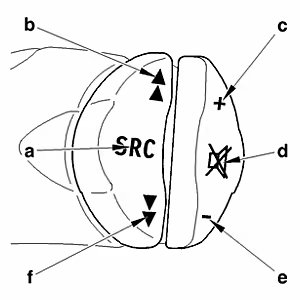
| Position | Function |
|---|---|
| A | Mode change button: CD player, telephone, cassette, tuner |
| B | Fast forward button / up search button (according to the audio source selected: tuner, CD changer, CD track, cassette, telephone) |
| C | Volume adjustment button "+" |
| D | "mute" function button |
| E | Volume adjustment button "-" |
| F | Rapid return button / down search button (according to the audio source selected: tuner, CD changer, CD track, cassette, telephone) |
Parts & tools for this job For 2003 Citroën C2
- PARTReplacement bulbsSearch: Citroën C2 2003 bulbs
- TOOLDigital multimeterSearch: automotive digital multimeter
As an Amazon Associate we earn from qualifying purchases.